
What is Salesforce? Salesforce is a cloud-based customer relationship management platform that businesses use to manage sales, customer service, marketing and data in one connected system. It runs entirely in the cloud, so teams access it through a browser or mobile app with no servers to maintain. This guide explains what Salesforce is, what its main products do, how it is customised and who uses it.
Short answer: Salesforce is the world's best-known cloud CRM. It gives teams a shared record of every customer, automation for repetitive work and a platform to build custom apps. Its products are grouped into "clouds" for sales, service, marketing, commerce and data.
What is Salesforce?
Marc Benioff founded Salesforce in 1999 with the idea of delivering business software over the internet instead of as installed programs. That model is now called software as a service. Customers subscribe, Salesforce hosts and upgrades the platform, and administrators configure it to match their business.
At its core, Salesforce stores records, such as leads, accounts, contacts, opportunities and cases, and connects them to each other. Around that core sit automation tools, analytics, a development platform and an app marketplace.
Salesforce products and clouds
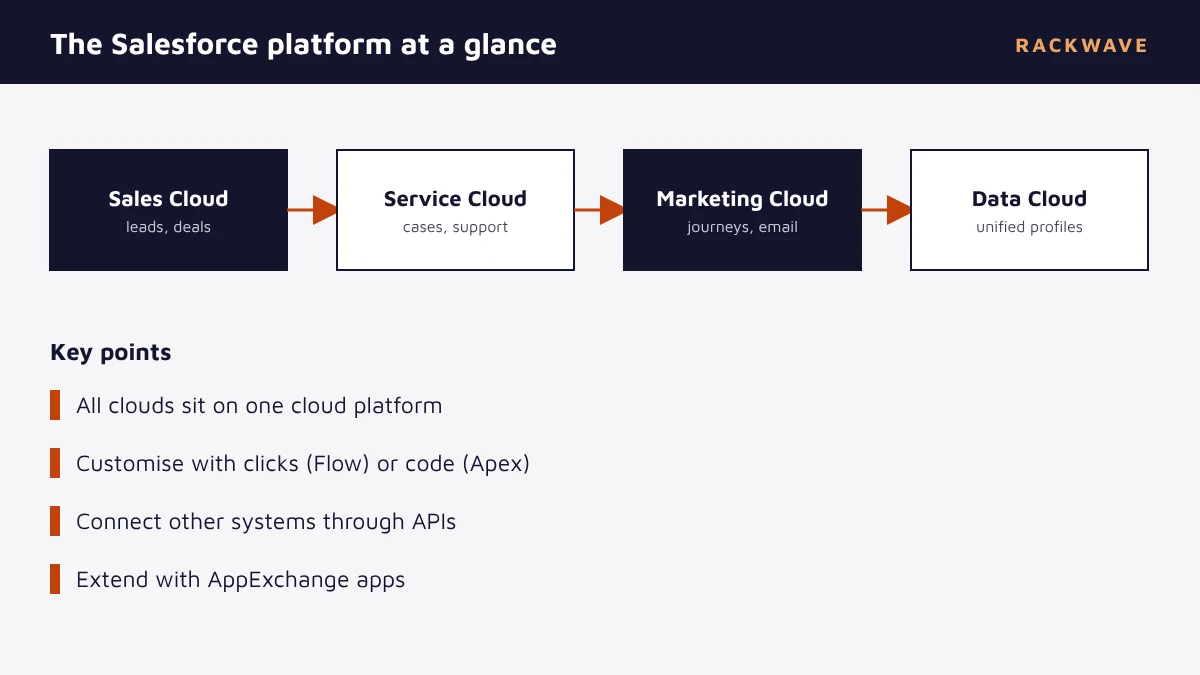
| Product | What it does | Learn more |
|---|---|---|
| Sales Cloud | Leads, opportunities, forecasting and sales productivity | Sales Cloud guide |
| Service Cloud | Case management, knowledge, omni-channel support | Service Cloud guide |
| Marketing Cloud | Email, mobile and journey-based marketing | What is SFMC |
| Commerce Cloud | B2C and B2B online storefronts | Commerce Cloud guide |
| Experience Cloud | Customer, partner and employee portals | Experience Cloud guide |
| Data Cloud (Data 360) | Unified customer profiles from many sources | Data Cloud guide |
| MuleSoft | API and integration platform | What is MuleSoft |
Salesforce also sells AI capabilities under the Agentforce brand, and vertical products for industries such as financial services, health care and manufacturing.
How Salesforce works
Salesforce is built on a metadata-driven platform. Objects such as Account or Opportunity are defined as metadata, and administrators add fields, page layouts and rules without writing code. The same platform exposes data and logic through APIs, so other systems can read and write records.
- Objects and records: the data model. Standard objects ship with Salesforce, and you add custom objects for your own needs. See custom objects.
- Security: profiles, permission sets and sharing rules control who sees what.
- Automation: Flow Builder automates business processes with clicks, and Apex handles complex logic in code.
- Reports and dashboards: live analytics on any object.
- Integration: REST and SOAP APIs, plus tools like MuleSoft. See Salesforce integration.
Benefits of Salesforce
Organisations choose Salesforce for flexibility and scale. A business can start with a single cloud and add others, because they share data and identity. The platform supports complex processes, multiple business units and global operations, and a large ecosystem of consultants, apps and training exists around it.
The strength of Salesforce is not any one feature. It is that sales, service, marketing and data teams work on the same customer record.
Who uses Salesforce?
Salesforce is used across industries, including financial services, health care, retail, manufacturing, technology and the public sector. Small teams use it for sales pipeline management, while large enterprises run global, multi-cloud deployments with custom applications and integrations.
Salesforce vs other CRMs
| Platform | Strength | Consider when |
|---|---|---|
| Salesforce | Deep customisation, ecosystem, enterprise scale | You have complex processes or many teams |
| HubSpot | Ease of use, integrated marketing and sales | You want fast setup and a unified marketing suite |
| Dynamics 365 | Microsoft integration and ERP alignment | You rely on Microsoft 365 and Azure |
See our full comparisons: Salesforce vs HubSpot and Dynamics 365 vs Salesforce. If you are new to the category, start with what is CRM.
How to get started with Salesforce
- Clarify the use case. Decide whether you are solving a sales, service, marketing or data problem first.
- Choose editions and clouds. Match licences to the features you need now, with room to grow.
- Design the data model. Map your processes to objects, fields and relationships before building.
- Configure and migrate. Build the setup in a sandbox, then load clean data with tools like the Data Loader.
- Train and launch. Train each role, go live in phases and review adoption regularly.
Learning resources such as Trailhead and the Salesforce developer site are useful for administrators and developers. For delivery, our Salesforce consulting services cover implementation, integration, data migration and managed support.
Salesforce editions and licensing basics
Each cloud is sold in editions that unlock different limits and features, usually with per-user pricing. Choosing an edition is a balance between the features you need on day one and the room you want for growth. Higher editions generally add more customisation, automation limits and sandboxes, while add-ons cover areas such as advanced analytics or additional storage.
Because pricing and packaging change, check the current options with Salesforce or an authorised partner. Remember that licences are only one part of cost. Implementation, integration, data migration and administration usually matter as much over the life of the programme.
Security and compliance
Salesforce provides layered security: login controls, two-factor authentication, object and field permissions, record sharing and audit trails. Optional products such as Salesforce Shield add event monitoring and encryption. Administrators remain responsible for configuring these controls correctly for their organisation.
AppExchange and the ecosystem
AppExchange is Salesforce's marketplace of apps and components. It lets you add capabilities such as document generation, e-signature or advanced analytics without building them yourself. Evaluate each app for security review, support and how it handles your data before installing it.
Common Salesforce implementation mistakes
- Replicating legacy processes without questioning them.
- Skipping a sandbox and testing changes in production.
- Loading unclean data and carrying old duplicates forward.
- Over-customising with code where standard features would do.
- Underinvesting in training and ongoing administration.
Skills and careers around Salesforce
An ecosystem of roles has grown around the platform. Administrators configure and maintain the org. Developers write Apex and Lightning Web Components. Architects design the overall solution and integrations. Business analysts translate processes into requirements, and consultants deliver projects. Marketing specialists work in Marketing Cloud, and data specialists in Data Cloud and analytics.
Certifications from Salesforce validate skills in each area, and Trailhead offers free learning paths. When hiring a partner, ask which certifications the team holds and what delivery experience they have in your industry.
Next steps
If you are exploring Salesforce for the first time, write down the three processes you most want to improve and bring them to a discovery conversation. If you already use it, ask where users still rely on spreadsheets or manual hand-offs, because those are usually the best candidates for automation and integration. Either way, begin with a focused first release and expand once adoption is strong.
Key takeaways
- Salesforce is a cloud CRM and application platform.
- Its products are grouped into clouds that share one customer record.
- Admins configure with clicks; developers extend with Apex and components.
- Integration, data quality and training decide project success.
- Start focused, then expand cloud by cloud.
Quick glossary
| Term | Meaning |
|---|---|
| Org | Your own instance of Salesforce with its data and configuration |
| Object | A table-like structure, such as Account or Opportunity |
| Sandbox | A copy of an org used for development and testing |
| AppExchange | The marketplace for Salesforce apps and components |
Read next: Salesforce Agentforce: What It Is and How It Works · Salesforce Integration: Patterns, APIs and Best Practices · Salesforce Apex: What It Is, Triggers, Limits and Best Practices
Frequently asked questions
What is Salesforce used for?
Salesforce is used to manage sales pipelines, customer service, marketing campaigns, customer data and custom business applications on a cloud platform.
Is Salesforce a CRM?
Yes. Salesforce began as a CRM and remains best known as one, but it is now a broader platform that includes marketing, commerce, analytics, integration and AI products.
What is a Salesforce cloud?
A cloud is a group of Salesforce products for a business function, such as Sales Cloud, Service Cloud or Marketing Cloud. They run on the same platform and share data.
Do I need to code to use Salesforce?
No. Administrators configure objects, fields, page layouts and automation with point-and-click tools such as Flow Builder. Developers use Apex and Lightning Web Components for custom logic and interfaces.
How is Salesforce priced?
Salesforce is sold by subscription, usually per user per month with different editions and add-ons. Costs also include implementation, integrations and administration, so request a quote for your scenario.
What is the difference between Salesforce and HubSpot?
Salesforce is more configurable and suits complex organisations, while HubSpot is simpler and strong in marketing and sales for growing teams. The right choice depends on process complexity, budget and existing tools.
How long does it take to implement Salesforce?
A single-cloud deployment for a small team can take weeks, while multi-cloud programmes with integrations and migration take months. Scope and data quality drive the timeline.
Can Salesforce integrate with other systems?
Yes. It offers REST, SOAP and Bulk APIs, event streaming and integration platforms such as MuleSoft, so it can connect to ERP, finance, support and data systems.