
What is MuleSoft? MuleSoft is an integration and API platform that connects applications, data and devices across cloud and on-premises systems. Salesforce acquired the company in 2018, and its Anypoint Platform is now the core of Salesforce's integration offering. This guide explains what MuleSoft does, how API-led connectivity works, its main components and when it is the right tool.
Short answer: MuleSoft lets you build, run and manage APIs and integrations on one platform. Instead of wiring each system directly to every other system, you expose reusable APIs in layers, so new projects can build on what already exists.
What is MuleSoft?
Most organisations run many systems: CRM, ERP, e-commerce, support, finance and data platforms. Connecting them with custom point-to-point code becomes fragile as the number of systems grows. MuleSoft provides a platform and a design approach for connecting them through managed, reusable APIs, a style often grouped under enterprise application integration.
The company's product site describes the platform as a way to unify data, automate workflows and connect applications. In practice, that means a central place to design APIs, build integration flows, secure them and watch how they perform.
API-led connectivity
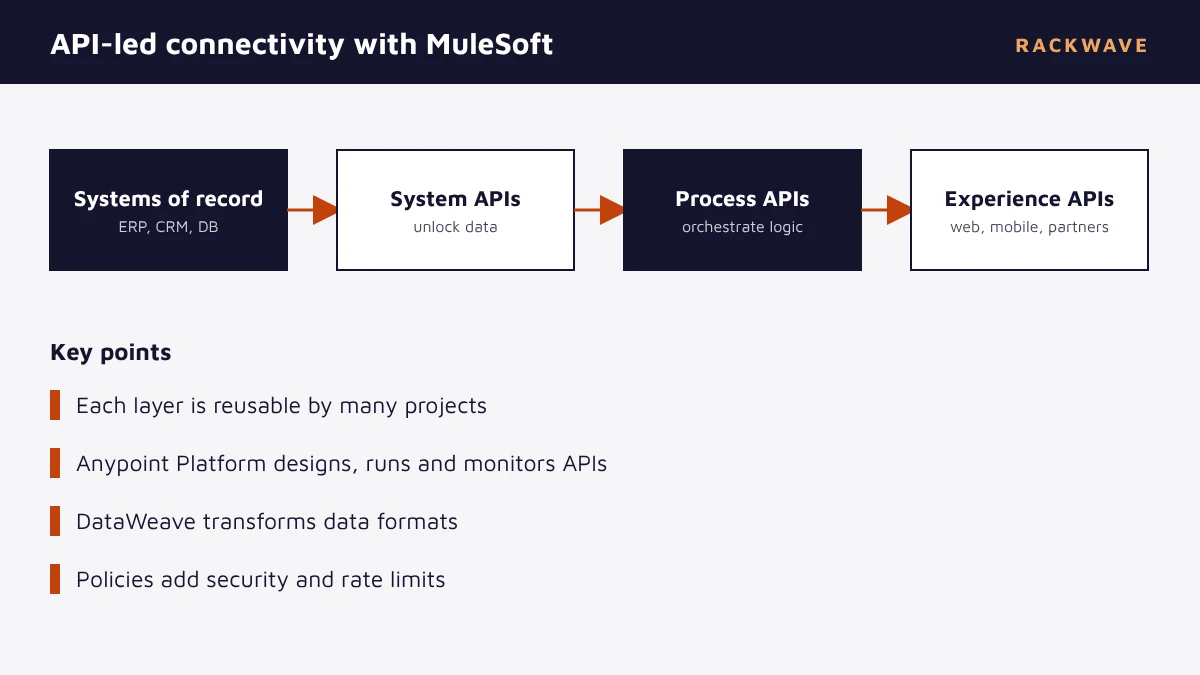
| Layer | Purpose | Example |
|---|---|---|
| System APIs | Provide a clean interface to a system of record, hiding its complexity | Customer API over the ERP; order API over the commerce platform |
| Process APIs | Combine system APIs to implement business logic | Create-order process that checks stock, credit and pricing |
| Experience APIs | Shape data for a particular channel or audience | Mobile app API; partner portal API |
The benefit is reuse and resilience. If you replace the ERP, you change the system API, and the process and experience APIs keep working. For a deeper look, see our guide to API-led connectivity.
Main components of the Anypoint Platform
- Anypoint Studio: the development environment for building Mule applications.
- Mule runtime: the engine that runs integration flows, in the cloud or on your own infrastructure.
- DataWeave: the expression language that transforms data between formats such as JSON, XML and CSV.
- Anypoint Exchange: a catalogue of APIs, connectors and templates for reuse.
- API Manager: applies policies such as authentication, rate limiting and throttling. See what is an API gateway.
- Runtime Manager and monitoring: deploy, scale and observe applications.
- Connectors: prebuilt connections to Salesforce, databases, SAP, messaging systems and many more.
Our overview of the Anypoint Platform and the older Mule ESB concept describe these components in more detail.
A simple integration flow
A Mule application is built from flows. A flow starts with an event source, such as an HTTP request or a schedule, and passes the message through processors that transform, route and send data. In this example, a request arrives, the payload is transformed with DataWeave and a record is created in Salesforce.
<flow name="createAccountFlow">
  <http:listener config-ref="HTTP_Listener" path="/accounts"/>
  <ee:transform>
    <ee:message>
      <ee:set-payload><![CDATA[%dw 2.0
output application/java
---
[{ Name: payload.companyName, Industry: payload.sector }]]]></ee:set-payload>
    </ee:message>
  </ee:transform>
  <salesforce:create type="Account" config-ref="Salesforce_Config"/>
</flow>
Common MuleSoft use cases
- Connecting Salesforce to ERP and finance systems so orders and invoices stay in sync.
- Building a single customer API that several channels reuse.
- Migrating from legacy middleware to managed APIs.
- Exposing internal services securely to partners.
- Automating data flows between cloud applications and on-premises databases.
When is MuleSoft the right choice?
| Situation | MuleSoft fit |
|---|---|
| Many systems and growing integrations | Strong: reuse and central governance pay off |
| Need for API management, security and analytics | Strong: built into the platform |
| One simple connection between two apps | Often unnecessary; a native connector or Flow may be enough |
| Small team and tight budget | Evaluate carefully; consider lighter integration tools |
Integration is not about connecting two systems once. It is about being able to change either of them later without breaking the rest.
Best practices
- Design APIs first, using a specification such as OpenAPI, before writing flows.
- Keep the three layers separate and reusable.
- Secure every API with policies and manage credentials centrally.
- Add error handling, retries and logging to every flow.
- Monitor performance and set alerts from day one.
- Version APIs so consumers are not broken by changes.
MuleSoft often sits beside other approaches. Read what is system integration for the wider landscape and Salesforce integration for patterns specific to Salesforce. Our MuleSoft services and API development teams design and build these solutions.
MuleSoft deployment options
Mule applications can run on MuleSoft's cloud (CloudHub), in your own cloud account or data centre, or in containers on Kubernetes. The right choice depends on data residency rules, existing infrastructure and the skills of your operations team. Regulated industries often keep runtimes close to sensitive systems while managing them from the central control plane.
Skills and team structure
A successful programme needs more than developers. You need an API designer who owns standards and contracts, integration developers who build flows, an operations owner for deployment and monitoring, and a product owner who decides which capabilities to expose. Many organisations set up a small centre of excellence that publishes templates, naming conventions and security policies, so every team builds in the same way.
Common mistakes to avoid
- Building flows before designing APIs. Contracts drift and consumers break.
- Putting business logic in the wrong layer. System APIs should stay thin and stable.
- Ignoring non-functional requirements. Throughput, latency and failure modes need targets before build.
- No governance. Without standards, you end up with a tangle of unmanaged APIs.
- Under-sizing monitoring. Alerts and dashboards are part of the deliverable, not an extra.
Getting started with MuleSoft
A practical way to start is to choose one valuable integration and deliver it end to end. Pick a process that crosses two systems, such as order status flowing from the ERP to Salesforce. Design the API contract first, build the system and process layers, add policies and monitoring, and document the result in Exchange. That first project becomes the template for later ones.
Plan training early. Developers need to learn Anypoint Studio, DataWeave and the Mule runtime, and architects need to learn API design and governance. MuleSoft provides training and certifications, and many organisations bring in a partner to accelerate the first projects while their own team builds skills.
MuleSoft compared with other options
Lightweight iPaaS tools are quick to adopt and suit teams that mainly need to connect SaaS applications with prebuilt recipes. MuleSoft is heavier, but offers deeper API management, hybrid deployment and a design model for governing many APIs across a large organisation. Custom code gives full control, yet every integration then becomes something your own team must secure, monitor and maintain. Match the tool to the size of the estate and the maturity of your engineering practice.
Cost considerations
MuleSoft is licensed by capacity, typically based on the compute resources your applications use, plus the platform features you enable. Total cost also includes development, environments, support and operations. Model realistic volumes and the number of integrations over several years, and compare against lighter tools for simple cases so you invest in the platform only where its governance and reuse create value.
Key takeaways
- MuleSoft is an integration and API platform owned by Salesforce.
- API-led connectivity organises integration into reusable layers.
- Design APIs before building flows.
- It pays off as integrations and consumers multiply.
- Governance, monitoring and skills matter as much as the tool.
Quick glossary
| Term | Meaning |
|---|---|
| Anypoint Platform | MuleSoft's suite for building and managing APIs and integrations |
| Mule runtime | The engine that runs Mule applications |
| DataWeave | Language for transforming data formats |
| Exchange | Catalogue of reusable APIs and connectors |
Read next: What Is Middleware? Types, Examples and How It Works · MuleSoft API-Led Connectivity · MuleSoft Anypoint Platform
Frequently asked questions
What is MuleSoft used for?
MuleSoft is used to connect applications, data and devices through APIs and integration flows, so systems such as CRM, ERP and e-commerce can share data reliably.
What is the MuleSoft Anypoint Platform?
Anypoint Platform is MuleSoft's suite for designing, building, deploying, securing and monitoring APIs and integrations.
What is API-led connectivity?
It is an approach that organises integrations into three reusable layers, system, process and experience APIs, so new projects build on existing assets instead of starting from scratch.
What is DataWeave?
DataWeave is MuleSoft's expression language for transforming data between formats such as JSON, XML and CSV.
Who owns MuleSoft?
Salesforce acquired MuleSoft in 2018. It operates as Salesforce's integration and API management product while still connecting non-Salesforce systems.
Is MuleSoft only for Salesforce?
No. MuleSoft connects many systems, including databases, ERP platforms and messaging services. It has strong Salesforce connectors, but is a general integration platform.
MuleSoft vs an ESB: what is the difference?
A traditional ESB centralises integration logic in one bus. MuleSoft grew from an ESB but promotes API-led design with reusable layers and decentralised delivery.
Do I need MuleSoft for simple integrations?
Not always. A native connector, a Salesforce Flow or a lightweight integration tool can be enough for one or two simple connections. MuleSoft pays off as integrations multiply.