
Salesforce Apex is the proprietary programming language of the platform. It lets developers add custom business logic to the platform, such as triggers that run when a record changes, classes that process data in bulk and web services that other systems call. This guide explains what Apex is, where it runs, the limits you must design around and when to use it instead of Flow.
Short answer: Apex is a strongly typed, object-oriented language with Java-like syntax that runs on Salesforce servers. You use it for logic that clicks-based tools cannot handle. Because Salesforce is multi-tenant, Apex is subject to governor limits and requires at least 75% test coverage to deploy to production.
What is Apex?
Apex runs natively on the Salesforce platform and has built-in access to your data through SOQL (Salesforce Object Query Language) and DML (data manipulation) statements. Its syntax will be familiar to anyone who knows Java or C#. Code is written in classes and triggers, compiled and stored on the platform, and executed in response to events.
What can you build with Apex?
- Triggers: code that runs before or after a record is inserted, updated, deleted or undeleted.
- Classes and services: reusable business logic, called from triggers, flows or user interfaces.
- Batch and queueable jobs: process large data sets asynchronously.
- Scheduled jobs: run logic at set times.
- REST and SOAP services: expose custom endpoints for external systems, complementing the standard REST API.
- Controllers: back Lightning Web Components and Visualforce pages.
How an Apex trigger runs
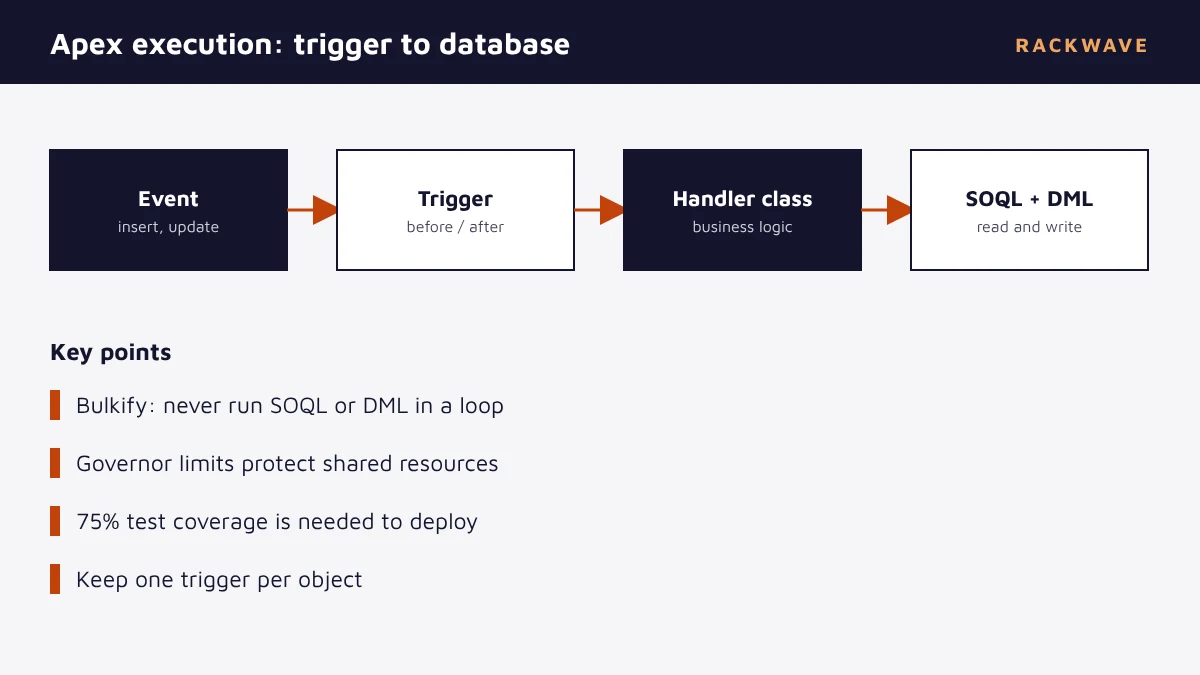
A trigger is a small piece of code attached to an object. Best practice is to keep one trigger per object and delegate the logic to a handler class, which makes the code easier to test and maintain. This example updates a field on new Opportunities.
trigger OpportunityTrigger on Opportunity (before insert, before update) {
    OpportunityHandler.setDefaults(Trigger.new);
}

public class OpportunityHandler {
    public static void setDefaults(List<Opportunity> opps) {
        for (Opportunity o : opps) {
            if (o.Amount != null && o.Amount > 100000) {
                o.Priority__c = 'High';
            }
        }
    }
}
Notice that the handler works on a list of records. Salesforce sends records to triggers in batches of up to 200, so code must always handle collections, not single records.
Governor limits you must know
Salesforce shares infrastructure between many customers, so it enforces limits to keep any one transaction from consuming too much. The figures below are the commonly cited per-transaction limits. Check the current Apex documentation on the Salesforce developer site because limits can change.
| Limit | Synchronous | Asynchronous |
|---|---|---|
| SOQL queries | 100 | 200 |
| DML statements | 150 | 150 |
| Records returned by SOQL | 50,000 | 50,000 |
| CPU time | 10 seconds | 60 seconds |
| Heap size | 6 MB | 12 MB |
The golden rule: bulkify. Never put a SOQL query or DML statement inside a loop. Query once, work with collections and maps, and write once. Code that works for one record but fails on a 200-record load is the most common Apex bug.
Apex or Flow?
| Choose | When |
|---|---|
| Flow Builder | The logic is declarative: field updates, record creation, approvals and screens. Admins can maintain it. |
| Apex | You need complex calculations, callouts with custom handling, high-volume processing or fine control over transactions. |
| Both | Flow handles the process, and invocable Apex handles a specific complex step. |
Start with the simplest tool that works. Declarative automation is easier to maintain and does not require a developer for every change.
Testing and deployment
Salesforce requires Apex test classes that cover at least 75% of your code before it can be deployed to production, and every trigger needs some coverage. Coverage is a minimum, not a goal. Good tests assert behaviour, include bulk scenarios and negative cases, and create their own data rather than relying on existing records.
- Write code in a sandbox. Use a sandbox or scratch org so production is never touched while developing.
- Write tests alongside code. Cover success, failure and bulk paths, with assertions.
- Run all tests. Confirm that existing tests still pass after your change.
- Deploy with a pipeline. Use change sets or a CI/CD process with source control. See change sets.
- Monitor in production. Watch debug logs, error emails and limits usage after release.
Best practices
- One trigger per object, with logic in handler classes.
- Bulkify every method and avoid queries and DML in loops.
- Use custom metadata or custom settings instead of hard-coded values.
- Handle exceptions and log failures.
- Respect security: use
with sharingand check field-level access when needed. - Document classes and keep methods short.
Apex is powerful, but every line is a line to maintain. Use it where it earns its place.
Apex also underpins integrations. If you are connecting Salesforce to other systems, read Salesforce integration and use named credentials for callouts. For delivery help, see our Salesforce services.
SOQL and DML in brief
SOQL reads data and looks similar to SQL: SELECT Id, Name FROM Account WHERE Industry = 'Banking'. DML writes data with statements such as insert, update, upsert, delete and undelete. Both count toward governor limits, which is why you query once, hold results in a map keyed by Id, and perform DML on whole lists.
Use bind variables rather than building query strings from user input, which prevents SOQL injection. Select only the fields you need, and add filters and limits so queries stay selective on large objects.
Asynchronous Apex
Some work is too heavy or slow for a user transaction. Salesforce offers several asynchronous options, each with higher limits:
- Future methods: simple fire-and-forget work, such as a callout after a save.
- Queueable Apex: chainable jobs that accept complex parameters.
- Batch Apex: processes millions of records in chunks.
- Scheduled Apex: runs on a timetable you define.
Pick the lightest option that fits. Batch Apex suits data clean-up and large recalculations, while Queueable is the usual choice for post-save processing and callouts.
Apex and integration
Apex is often the glue in integrations: it makes callouts to external APIs, receives inbound REST requests and publishes platform events. When you build these, keep credentials out of code with named credentials, plan for API limits and add retry logic so one failed call does not lose data.
Debugging and monitoring Apex
When code fails in production, you need evidence. Debug logs record each step of a transaction, including SOQL, DML and limits used, and can be filtered by user and time. The Developer Console and other tools let you read them, and the limit summaries at the end of a log show how close a transaction came to its caps. Add structured logging for important operations, but avoid writing sensitive data to logs.
Unhandled exceptions trigger error emails and appear in the Apex Exception report. Set up monitoring so someone is told when jobs fail. For asynchronous work, check the Apex Jobs page to see queued, running and failed jobs, and design retries for failures that are likely to be temporary.
Security basics for Apex
- Run in the right sharing mode:
with sharingrespects record access rules. - Check object and field permissions before returning data to users.
- Never concatenate user input into SOQL strings; use bind variables.
- Keep secrets in named credentials or protected custom metadata.
- Review third-party packages before installing them.
Key takeaways
- Apex is Salesforce's Java-like language for custom server-side logic.
- Always bulkify: no SOQL or DML inside loops.
- Know the governor limits and design within them.
- Keep one trigger per object and use handler classes.
- Prefer Flow for simple automation, Apex for complex logic.
Quick glossary
| Term | Meaning |
|---|---|
| Trigger | Code that runs before or after a record event |
| Governor limits | Per-transaction caps on resources |
| SOQL | Salesforce Object Query Language for reading data |
| DML | Data manipulation statements that write data |
Read next: Salesforce Agentforce: What It Is and How It Works · Salesforce Integration: Patterns, APIs and Best Practices · Salesforce Data Cloud (Data 360): What It Is and How It Works
Frequently asked questions
What is Apex in Salesforce?
Apex is Salesforce's object-oriented programming language for adding custom business logic to the platform, such as triggers, classes, batch jobs and web services.
Is Apex similar to Java?
Yes. Apex has Java-like syntax and is strongly typed and object-oriented, but it runs only on the Salesforce platform and includes built-in database features such as SOQL and DML.
What are governor limits?
Governor limits are per-transaction caps on resources such as SOQL queries, DML statements, CPU time and heap size. They exist because Salesforce is multi-tenant, and code must be designed to stay within them.
What does bulkify mean?
Bulkifying means writing code that handles many records at once, by querying and updating in collections instead of inside loops, so it works when Salesforce sends up to 200 records to a trigger.
How much test coverage does Apex need?
At least 75% of Apex code must be covered by tests to deploy to production, and each trigger must have some coverage. Aim for meaningful assertions rather than just reaching the percentage.
When should I use Apex instead of Flow?
Use Flow for declarative automation that admins can maintain. Use Apex for complex logic, large volumes or specialised integrations that Flow cannot handle efficiently.
What is SOQL?
SOQL, or Salesforce Object Query Language, is the query language used to read Salesforce data. It looks like SQL but works with objects and fields instead of tables and columns.
Do I need to be a developer to learn Apex?
Basic programming knowledge helps, especially in Java or C#. Free Trailhead modules on the Salesforce site are a common starting point for admins moving into development.