
CRM vs ERP is a common question when a growing business realises it needs more than spreadsheets: CRM, customer relationship management, manages the relationship with customers and prospects, while ERP, enterprise resource planning, manages the internal resources of the business such as finance, inventory, purchasing and production. They solve different problems, they share data and in most mid-sized companies they work best when integrated. This guide explains what each system does, where they overlap, how to tell which you need first, how to connect them and the integration mistakes that cause duplicate records, slow quotes and arguments about whose numbers are right.
Short answer: CRM faces the customer: leads, deals, service and marketing. ERP faces the organisation: money, stock, purchasing and operations. Choose the one that addresses your biggest bottleneck, but plan from the start for them to exchange customer, product and order data.
What is CRM?
A CRM records every interaction with customers and prospects and supports the teams that deal with them. It tracks leads, opportunities, quotes, cases and campaigns, and gives managers visibility of pipeline and service. Its central object is the customer relationship. Read more in our guides to what is CRM and CRM software.
What is ERP?
Enterprise resource planning software integrates the core back-office processes of a company: accounting, invoicing, procurement, inventory, manufacturing, HR and sometimes project management. Its central object is the transaction and the resource, such as an invoice, a purchase order or a stock item. It is the system of record for what the business owns, owes and has delivered. Our guide to what is ERP explains it in more depth.
CRM vs ERP: the key differences
| Aspect | CRM | ERP |
|---|---|---|
| Main purpose | Win, serve and keep customers | Run internal operations efficiently |
| Focus | Front office: sales, marketing, service | Back office: finance, supply chain, production |
| Central records | Leads, contacts, accounts, opportunities, cases | Invoices, orders, stock, suppliers, ledgers |
| Typical users | Sales, marketing, support, account managers | Finance, operations, procurement, warehouse |
| Key outputs | Pipeline, forecast, campaign results, satisfaction | Financial statements, stock levels, costs, schedules |
| Pace of change | Configured often as sales approach evolves | More stable, governed by finance and compliance |
| Example platforms | Salesforce, HubSpot, Dynamics 365 Sales | Dynamics 365 Finance, SAP, Oracle, Business Central |
Where CRM and ERP overlap
The boundary is blurry because customers appear in both systems. The customer is a contact and a deal in the CRM, and a billing account with payment terms in the ERP. Products and prices have a similar overlap: the catalogue is maintained in ERP, and sales reps quote from it in CRM.
| Shared area | CRM role | ERP role |
|---|---|---|
| Customer account | Relationship, contacts, history | Billing details, credit limit, payment terms |
| Product and price | Quotes and configuration. See Salesforce CPQ | Master catalogue, cost and availability |
| Orders | Closed-won deal creates the order request | Fulfilment, shipping and invoicing |
| Contracts and renewals | Renewal opportunities and reminders | Revenue recognition and billing schedules |
| Reporting | Pipeline and customer insight | Financial and operational performance |
Many suites, such as Microsoft Dynamics 365, offer CRM and ERP modules on one platform, which reduces integration work. See what is Microsoft Dynamics and Dynamics 365 Finance. Other companies combine best-of-breed products and integrate them.
The system that owns a piece of data should be decided once, written down and respected by every integration.
Which do you need first?
| If your biggest pain is | Start with | Why |
|---|---|---|
| Leads get lost and follow-up is inconsistent | CRM | Fix the sales process and customer visibility first |
| Invoicing, stock or month-end close is slow and error-prone | ERP | Fix the financial and operational backbone first |
| Sales promise stock that is not available | Integrate both | Real-time availability must reach the quote |
| Customers receive invoices that contradict the order | Integrate both | Order and billing data must stay in step |
| A small team with few products and simple billing | CRM plus accounting software | Full ERP may be more than you need |
How to integrate CRM and ERP
- Decide the system of record. For each object, such as customer, product, price and order, choose which system owns it.
- Map the fields. Match identifiers, formats and required values between the two data models.
- Choose the integration pattern. Use real-time APIs for quotes and availability, and scheduled batches for large, less urgent data. See what is system integration.
- Use an integration layer. Platforms such as MuleSoft keep logic out of both systems and make changes safer. See what is MuleSoft.
- Handle errors and retries. Decide what happens when a record is rejected, and who is told.
- Test with real scenarios. Quote, order, ship, invoice, credit and renew, with realistic edge cases.
- Monitor and govern. Track sync failures and review the data mapping when either system changes.
What flows between CRM and ERP
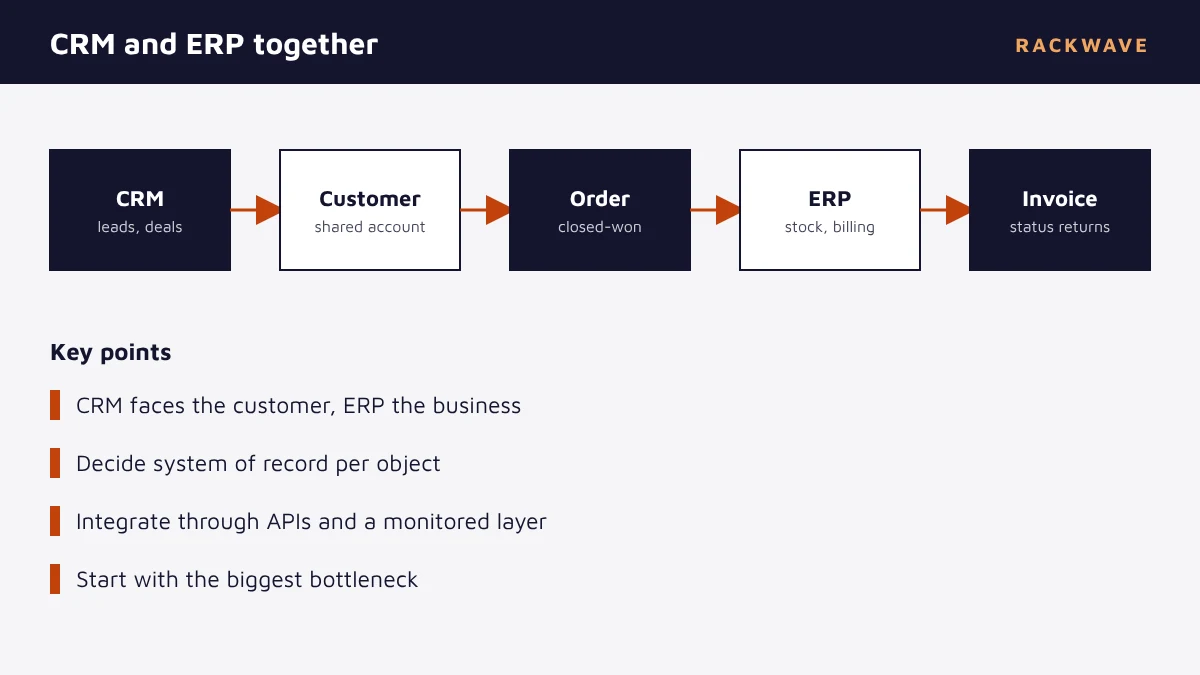
- Customers: new accounts from CRM create billing accounts in ERP, and credit status flows back.
- Products and prices: ERP publishes catalogue and price lists to CRM for quoting.
- Orders: a closed-won opportunity creates a sales order in ERP.
- Invoices and payments: status returns to CRM so reps and service see what is paid or overdue.
- Inventory: availability appears in the quote screen.
- Service and returns: cases link to the original order and warranty data.
Because these flows run through interfaces, good API design matters. Our system integration service and API development service design and build them, and our CRM integration guide covers the patterns in more depth.
Common mistakes when combining CRM and ERP
- Creating the customer separately in both systems, then fighting over duplicates. See master data management.
- Letting both systems edit the same field with no rule on which wins.
- Building point-to-point integrations that break whenever either side is upgraded.
- Ignoring error handling, so failed syncs stay silent for weeks.
- Exposing the whole ERP price book instead of the prices the sales team may use.
- Not training sales on what ERP data they can and cannot change.
CRM vs ERP for different business types
| Business | Typical need |
|---|---|
| Services and consulting | CRM first, with project and billing tools or light ERP |
| Distribution and wholesale | Both, with strong inventory and price integration |
| Manufacturing | ERP central, CRM for sales and service, with order and bill-of-materials links |
| E-commerce | Commerce platform, CRM for lifecycle and service, ERP or accounting for stock and finance. See our e-commerce expertise |
| Subscription and SaaS | CRM and billing system tightly integrated for renewals and revenue |
A practical example of CRM and ERP working together
Consider a distributor that sells industrial components. A sales rep creates a quote in the CRM. The product list and customer-specific prices come from the ERP, and the quote screen shows live stock so the rep does not promise parts that are not on the shelf. When the customer accepts, the closed-won opportunity creates a sales order in the ERP. The warehouse picks and ships, finance invoices, and the invoice number and payment status flow back to the CRM. Months later, a service agent opening a complaint sees the original order, the delivery date and whether the invoice was paid. Nobody re-keys anything, and sales, finance and service all quote the same figures. Without the integration, each of those hand-offs becomes an email, a spreadsheet or a phone call, and every one is a chance for an error.
The same design thinking applies in the other direction. Finance may place a customer on credit hold in the ERP, and the CRM should show a warning on the account so a rep does not sign a new deal blindly. Small touches like this are what make an integrated landscape feel like one company rather than two departments with separate truths.
Key takeaways
- CRM manages customer relationships; ERP manages internal resources and transactions.
- They overlap on customers, products, orders and reporting, so decide system-of-record rules early.
- Start with the system that addresses your largest bottleneck, but plan the integration.
- Use an integration layer, clear field mapping and monitored error handling.
- Avoid duplicate masters, point-to-point sprawl and silent sync failures.
Quick glossary
| Term | Meaning |
|---|---|
| System of record | The system that owns the authoritative version of a data item |
| Master data | Core reference data such as customers and products |
| API | An interface that lets systems exchange data |
| CPQ | Configure, price and quote tooling |
| Order to cash | The process from sales order to payment received |
Read next: Voice of Customer: Sources, Programme and Examples · Omnichannel Marketing: Strategy, Examples and Technology · RFM Analysis: Scoring, Segments and Marketing Use
Frequently asked questions
What is the difference between CRM and ERP?
CRM manages customer relationships, sales, marketing and service. ERP manages internal operations such as finance, inventory, purchasing and production. They serve different teams and often exchange data.
Do I need both CRM and ERP?
Many mid-sized and larger companies do. A small business may start with CRM plus accounting software and add ERP when operational complexity grows.
Can CRM replace ERP?
No. CRM lacks the accounting, inventory and production controls that ERP provides. Some suites offer both modules on one platform, but the functions remain distinct.
Can ERP replace CRM?
Most ERP systems include basic customer records, but their sales and service tools are usually less capable than a dedicated CRM, especially for pipeline, marketing and service workflows.
Which should I implement first, CRM or ERP?
Start with whichever addresses your biggest bottleneck. If lost leads and poor follow-up hurt most, begin with CRM. If finance, stock or fulfilment problems dominate, begin with ERP.
How do CRM and ERP integrate?
Through APIs or an integration platform that syncs customers, products, prices, orders and invoices, with defined systems of record, field mapping and error handling.
What are examples of CRM and ERP software?
CRM examples include Salesforce, HubSpot and Dynamics 365 Sales. ERP examples include Dynamics 365 Finance, SAP, Oracle and Microsoft Dynamics 365 Business Central.
What goes wrong when CRM and ERP are not integrated?
Teams re-key data, customer and order records diverge, quotes use stale prices or stock and finance and sales report different numbers for the same customer.