
CRM software is a system that records every interaction a business has with its customers and prospects, then uses that history to help sales, marketing and service teams work together. It replaces scattered spreadsheets, inboxes and memory with one shared record of who the customer is, what they have bought, what they have asked and what should happen next. This guide explains what CRM software does, its core features, how the main platforms differ, what to look for when choosing one, how much planning a rollout needs and the mistakes that leave expensive systems half-used.
Short answer: CRM software stores contacts, accounts, deals and service cases in one place, automates routine follow-up and reports on the pipeline. The best CRM for you is the one your people will actually keep up to date, so fit with your process and existing tools matters more than the length of the feature list.
What does CRM software do?
Customer relationship management software began as a digital address book for salespeople. It has grown into a platform that coordinates the whole customer relationship. A new enquiry arrives, gets routed to the right person, is followed up within a set time, moves through a pipeline and, once won, becomes a customer whose orders, tickets and renewals are visible to everyone who needs them. If you want the underlying idea first, read our guide to what is CRM.
The value is shared visibility. A salesperson sees an open support complaint before calling. A support agent sees a pending renewal. A marketer sees which campaigns produced revenue rather than just clicks. None of this needs advanced technology. It needs disciplined data entry, clear ownership and a system that makes the right thing the easy thing.
Core features of CRM software
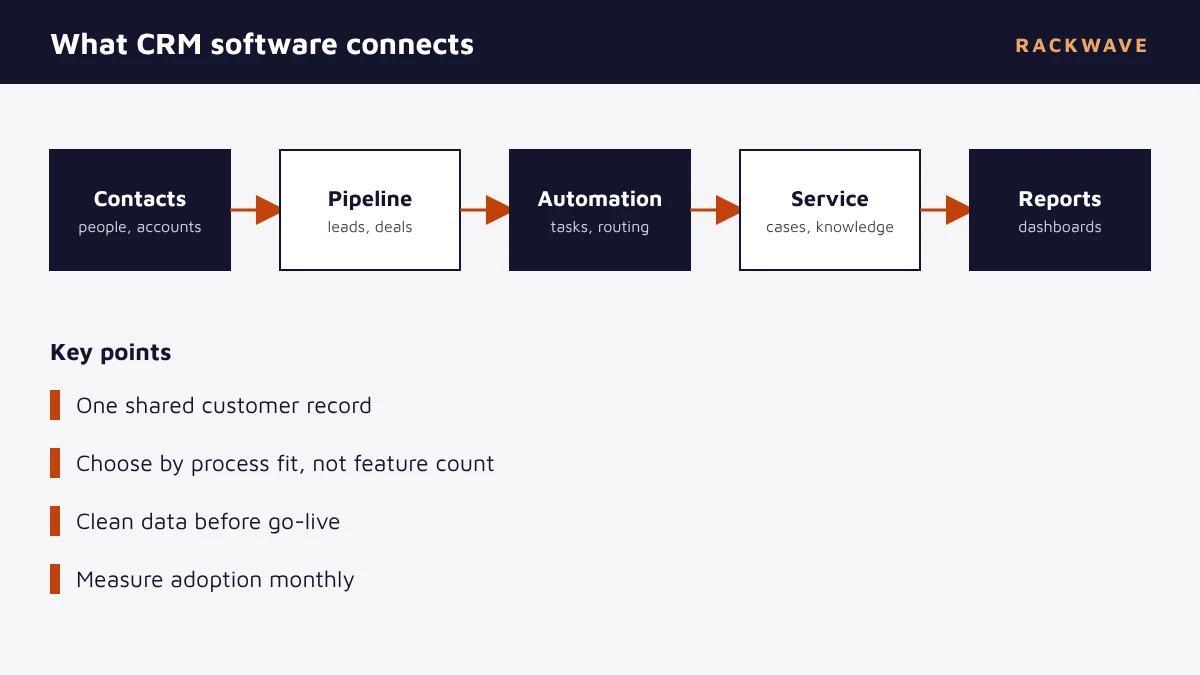
| Feature | What it does | Who uses it |
|---|---|---|
| Contact and account management | Stores people, companies, roles and history | Everyone |
| Lead and opportunity management | Tracks prospects through pipeline stages. See sales pipeline | Sales |
| Activity tracking | Logs calls, meetings, emails and tasks | Sales and service |
| Workflow automation | Assigns, reminds, escalates and updates automatically. See workflow automation | Operations |
| Marketing tools | Segmentation, campaigns and attribution. See marketing automation | Marketing |
| Service and case management | Tickets, knowledge and service levels | Support |
| Reports and dashboards | Pipeline, forecast, activity and service metrics | Managers |
| Integrations and APIs | Connect finance, e-commerce, email and data tools. See CRM integration | IT |
| Mobile access | Update records from the field | Field teams |
Types of CRM software
CRM products are usually grouped by what they emphasise. Most modern platforms blend all three, and we compare the categories in detail in types of CRM.
- Operational CRM automates sales, marketing and service processes day to day.
- Analytical CRM studies customer data to find patterns, segments and value.
- Collaborative CRM shares customer information across teams and partners.
Popular CRM platforms at a glance
| Platform | Best known for | Consider when |
|---|---|---|
| Salesforce | Deep configurability, large ecosystem. See what is Salesforce | You need a platform that can model complex processes |
| HubSpot | Ease of use, marketing and sales in one place. See HubSpot CRM | Growing teams that want fast adoption |
| Microsoft Dynamics 365 | Fit with Microsoft 365 and Azure. See Dynamics 365 Sales | You run on the Microsoft stack |
| Zoho, Pipedrive and similar | Lower cost, simpler setup | Small teams with straightforward sales processes |
| Industry-specific CRMs | Built-in data models for a sector | Your sector has unusual requirements, such as lending or healthcare |
We implement and integrate Salesforce, HubSpot and Dynamics 365 through our CRM and lifecycle service, and we would rather help you choose the right fit than push a particular logo.
A CRM is not a database you buy. It is a habit you build, with software to support it.
How to choose CRM software
- Write down your process first. Map how a lead becomes a customer and how service requests are handled. Software should follow the process, not invent it.
- List the must-have needs. Separate genuine requirements, such as an integration with your billing system, from nice-to-haves.
- Involve the people who will use it. Sales reps, service agents and marketers each spot problems that managers miss.
- Check integrations. Confirm the CRM connects to your email, finance, website and data tools, and decide whether native connectors or custom APIs are needed.
- Shortlist two or three and run a pilot. Use real data and real scenarios, not vendor demos.
- Check total cost. Include licences, implementation, integration, training and ongoing administration. We avoid quoting prices here because they change often and vary by edition.
- Plan the rollout. Decide data migration, training, owners and success measures before you sign.
Questions to ask every vendor
- How does the system handle our specific process, and what needs custom configuration?
- What does the data model look like, and can we add custom objects and fields?
- How do permissions work, and can we restrict records by team or region?
- What APIs and integration options exist, and what are the usage limits?
- How do we export all of our data if we leave?
- What reporting is built in, and what needs a separate analytics tool?
- What does support include, and how quickly do they respond?
Implementing CRM software well
Most failed CRM projects fail on people and data, not technology. Reps resist entering information that nobody uses. Managers ask for dozens of mandatory fields that slow everyone down. Migrated data is full of duplicates, and trust in the system collapses within weeks. A disciplined rollout avoids these traps. Our guide to CRM implementation covers the full process, and our CRM implementation service delivers it.
- Start with the smallest set of fields and stages that supports your process, and add later.
- Clean and deduplicate data before importing it. See data migration and data quality.
- Make the CRM the single place where deals and customer notes live, so people stop keeping shadow spreadsheets.
- Train by role, using the real process, not generic feature tours.
- Show managers using the dashboards in meetings, so entering data visibly pays off.
- Review adoption and data quality monthly, and fix friction quickly.
CRM software and automation
Automation is where a CRM repays its cost. New leads are assigned by territory or product, follow-up tasks appear automatically, stale deals prompt a reminder, and approvals route to the right person. Marketing can trigger journeys from CRM data, a topic we cover in lifecycle marketing and lead nurturing. Increasingly, AI features summarise accounts, suggest next actions and score leads. See lead scoring and Salesforce Agentforce for examples. Use these on top of good data, because AI amplifies whatever quality already exists.
Measuring whether your CRM is working
| Measure | What it tells you |
|---|---|
| Adoption: logins and records updated per user | Whether people really use it |
| Data completeness and duplicate rate | Whether you can trust the data |
| Lead response time | Whether follow-up is fast enough |
| Pipeline coverage and win rate | Health of the sales process. See sales forecasting |
| Case resolution time and satisfaction | Service quality. See customer satisfaction |
| Retention and renewal rate | Long-term relationship health. See customer retention |
Common CRM software mistakes
- Choosing by feature count instead of fit with the real process.
- Customising everything on day one and creating a system nobody understands.
- Skipping data cleanup and importing years of duplicates.
- Giving no one ownership of administration after launch.
- Ignoring integrations, so the CRM becomes another silo.
- Treating go-live as the finish line instead of the start of improvement.
Key takeaways
- CRM software gives teams one shared record of customers and the processes around them.
- Core features cover contacts, pipeline, activity, automation, service, reporting and integrations.
- Choose by process fit, integrations and adoption, not by feature count.
- Clean data, simple configuration and named owners decide success.
- Measure adoption and data quality as carefully as sales results.
Quick glossary
| Term | Meaning |
|---|---|
| Lead | A person or company that might become a customer |
| Opportunity | A potential sale tracked through pipeline stages |
| Pipeline | The stages a deal moves through to close |
| Custom object | A record type you define for your own process |
| Integration | A connection that exchanges data between systems |
Read next: Voice of Customer: Sources, Programme and Examples · Omnichannel Marketing: Strategy, Examples and Technology · RFM Analysis: Scoring, Segments and Marketing Use
Frequently asked questions
What is CRM software?
CRM software is a system that stores customer and prospect information and the interactions with them, and supports sales, marketing and service processes so teams share one view of each relationship.
What are the main features of CRM software?
Core features include contact and account management, lead and opportunity tracking, activity logging, workflow automation, marketing tools, case management, reports and dashboards, integrations and mobile access.
How do I choose the best CRM software?
Map your process, list real requirements, involve users, check integrations, pilot two or three options with real data and compare total cost, including implementation and administration.
What is the difference between CRM and ERP?
CRM manages customer relationships, sales and service. ERP manages internal operations such as finance, inventory and procurement. Many companies integrate the two so orders and invoices flow between them.
Is CRM software only for sales teams?
No. Marketing uses it for segmentation and attribution, and service teams use it for cases and knowledge. The value comes from every team sharing one customer record.
How long does it take to implement CRM software?
Simple setups can take weeks. Larger rollouts with data migration, integrations and custom processes take months. Timelines depend mostly on data quality and decision-making, not on installation.
Why do CRM projects fail?
Common reasons are poor data, too much complexity, weak ownership, no training tied to real work and no measurement of adoption. Technology problems are rarer than people and process problems.
Can CRM software integrate with other systems?
Yes. Most platforms offer native connectors and APIs for email, finance, e-commerce, support and data tools. Plan integrations early because they shape the design.