
What is data migration? Data migration is the process of moving data from one system, format or location to another. Organisations do it when they replace a CRM, move to the cloud, merge companies or consolidate databases. Done well, it is invisible. Done badly, it loses records, breaks reports and erodes trust in the new system. This guide explains the types of data migration, the steps, the risks and the tools.
Short answer: Data migration is extracting data from a source, transforming it to fit the target, loading it and validating the result. A reliable project profiles and cleans the data first, rehearses the load in a test environment and keeps the source system until the business signs off.
What is data migration?
It sounds like copying files, but real migrations involve different data models, field formats, relationships and business rules. A customer in an old CRM may need to be split into an account and a contact in the new one, and statuses may need translating. Migration is closely related to extract, transform, load (ETL), and our guide to ETL pipelines covers the technique in more depth.
Types of data migration
| Type | What moves | Typical trigger |
|---|---|---|
| Storage migration | Data between storage systems or media | Hardware upgrade, cloud storage |
| Database migration | Data between database engines or versions | Engine change, modernisation |
| Application migration | Data from one application to another | Replacing a CRM or ERP |
| Cloud migration | Data and workloads to a cloud platform | Moving off on-premises infrastructure |
| Business process migration | Data supporting a merged or restructured process | Mergers and acquisitions |
The data migration lifecycle
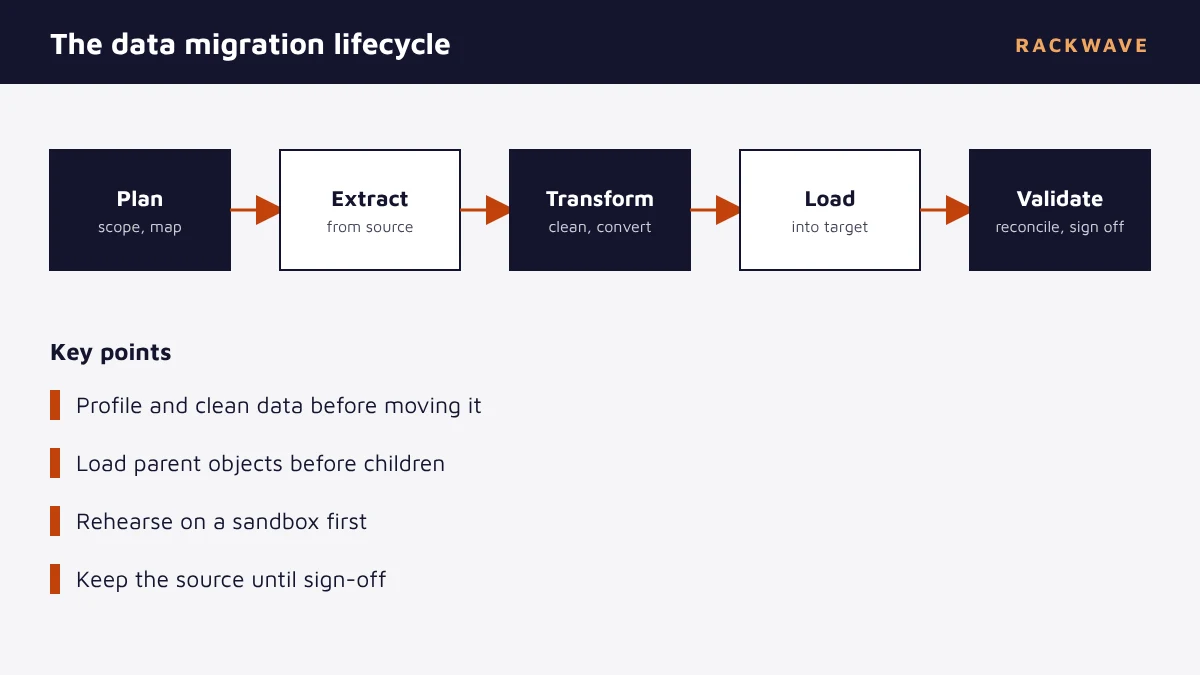
- Plan and scope. Decide what to migrate, what to archive, the timeline and who signs off. Document source and target systems.
- Profile and cleanse. Analyse completeness, duplicates, formats and referential integrity, then fix problems at the source or in transformation.
- Map the data. Define how every source field maps to a target field, including value translations and defaults.
- Extract and transform. Pull data from the source and convert it to the target format using scripts or tools.
- Load in order. Load parent records before children so relationships can be built, for example accounts before contacts and opportunities.
- Validate and reconcile. Compare counts, totals and samples between source and target, and get business users to verify.
- Cut over and decommission. Run final delta loads, switch users over and retire the old system only after sign-off.
Migration quality is decided before the first record moves: in the profiling and mapping.
Migrating data into Salesforce
Salesforce projects use several tools, depending on volume and complexity. The Data Import Wizard handles small, simple loads. The Data Loader suits larger files, and the Bulk API handles very large volumes. For complex transformation, teams use ETL or integration tools.
- Define an external ID on each object so you can upsert and keep a link to the source record.
- Load in dependency order: accounts, contacts, opportunities, then related records.
- Temporarily relax or bypass validation rules, flows and triggers during load, then re-enable and test them.
- Preserve original created dates and owners where the business needs history.
- Rehearse in a sandbox with a full-size extract before the production load.
Our dedicated Salesforce data migration service covers this end to end.
Common risks and how to reduce them
| Risk | What happens | Mitigation |
|---|---|---|
| Poor source data quality | Duplicates and gaps move into the new system | Profile and cleanse before migration |
| Data loss or truncation | Fields are cut or records dropped | Reconcile counts and checksums; test field lengths |
| Broken relationships | Orphaned child records | Load in order; use external IDs |
| Downtime and business disruption | Users cannot work during cutover | Plan a cutover window; use delta loads |
| Compliance breaches | Sensitive data exposed during transfer | Encrypt data, limit access and log every step |
| No rollback plan | Cannot recover from a failed load | Keep the source intact and back up the target |
Migration approaches: big bang or phased
A big bang migration moves everything in one cutover window. It is simpler to coordinate but carries higher risk if something fails. A phased approach moves data in stages, by region, business unit or object, which reduces risk and lets teams learn as they go, though it means running two systems in parallel for a while and keeping them in sync. Choose based on data volume, tolerance for downtime and the number of integrations.
Data migration best practices
- Treat migration as a project with an owner, budget and timeline.
- Involve business users in mapping and validation.
- Migrate only data that is needed. Archive the rest.
- Automate loads with scripts so they are repeatable.
- Run at least two full rehearsals before cutover.
- Document mappings, rules and decisions.
- Keep the source system read-only until sign-off.
Migration is often a part of a broader programme such as CRM implementation or a platform change, and may involve system integration to keep other systems aligned. If you are choosing a platform first, see what is Salesforce.
Data validation techniques
Validation proves that the migrated data is complete and correct. Use several layers. Start with row counts per object and compare them with the source, allowing for records you deliberately excluded. Then compare control totals, such as the sum of order values or the number of active customers. Next, sample records and check fields side by side with business users, since they notice errors a script cannot, such as a mis-translated status. Finally, run the key reports in both systems and compare the results.
Security and privacy during migration
Migration extracts data from protected systems and moves it through files and tools, which creates exposure. Encrypt data in transit and at rest, restrict who can access extracts and delete temporary copies when the project ends. Mask or anonymise personal data in test environments where possible. Check legal requirements for cross-border transfers and keep a log of who accessed what and when.
Preparing the business for cutover
Technical readiness is not enough. Tell users about freeze periods when they should not edit records, publish a cutover timeline and prepare a support channel for questions. Agree go and no-go criteria in advance, for example that reconciliation differences are below an agreed threshold. If criteria are not met, the plan should state clearly whether to delay or to roll back.
Data migration checklist
- Scope: objects, record counts, history and archive decisions agreed.
- Ownership: a named business owner for each data domain.
- Profiling: duplicates, nulls and invalid formats measured.
- Mapping: every field mapped, with value translations documented.
- Environments: a sandbox sized like production.
- Rehearsals: at least two full loads reconciled.
- Cutover: window, freeze period and communication plan set.
- Rollback: backup taken and rollback steps tested.
- Sign-off: business users verify before decommissioning the source.
Keep this checklist alongside your project plan and update it as decisions are made. A migration is finished only when the business accepts the data, not when the last file has loaded.
Key takeaways
- Data migration moves data between systems and formats.
- Quality is decided in profiling and mapping before the load.
- Load parent records before children and rehearse in a sandbox.
- Validate with counts, totals and business-user checks.
- Keep the source until the business signs off.
Quick glossary
| Term | Meaning |
|---|---|
| ETL | Extract, transform, load |
| Mapping | The rules linking source fields to target fields |
| Delta load | A load of only the records changed since the last load |
| Reconciliation | Comparing source and target to confirm they match |
Read next: Lead Nurturing: Strategy, Tactics and Examples · Data Quality: Dimensions, Causes and How to Improve It · What Is a Data Pipeline? Components, Types and Examples
Frequently asked questions
What is data migration?
Data migration is the process of moving data from one system, format or location to another, usually involving extraction, transformation, loading and validation.
What are the types of data migration?
The main types are storage, database, application, cloud and business process migration, depending on what is being moved and why.
What are the steps in a data migration?
Plan and scope, profile and cleanse, map fields, extract and transform, load, validate and reconcile, then cut over and decommission the old system.
What is the difference between data migration and ETL?
Data migration is usually a one-time move to a new system. ETL is an ongoing process that regularly extracts, transforms and loads data, often for analytics. They use similar techniques.
What are the biggest risks in data migration?
Poor source data quality, data loss or truncation, broken relationships, downtime, compliance breaches and lack of a rollback plan.
How long does a data migration take?
Small, clean migrations can take days. Large or complex ones involving cleansing, multiple systems and rehearsals take months. Data quality and number of mappings are the main factors.
What is the difference between big bang and phased migration?
Big bang moves all data in one cutover window, which is simpler but riskier. Phased migration moves data in stages, which reduces risk but requires running systems in parallel for a time.
What tools are used to migrate data into Salesforce?
Common tools are the Data Import Wizard for small loads, Data Loader for larger files, the Bulk API for very large volumes and ETL or integration platforms for complex transformation.