

An SMTP server is the system that accepts an email from a sender and passes it on until it reaches the recipient's mail server. If your website, CRM or app sends password resets, invoices or campaigns, an SMTP server is doing that work, whether you can see it or not. This guide explains what it does, which ports and settings to use, how authentication and reputation fit in, and how to decide between running your own server and using a managed service.
Short answer: SMTP (Simple Mail Transfer Protocol) is the standard way email moves between servers. Your application talks to an SMTP server on port 587 (or 465) with a username and password. That server looks up the recipient's domain in DNS, connects to their mail server on port 25 and hands the message over.
What is an SMTP server?
An SMTP server, also called a mail transfer agent or MTA, is software that sends and relays email using the protocol defined in RFC 5321. It has two jobs. First, it accepts messages from your applications and mail clients. Second, it delivers those messages to the servers that host the recipients' mailboxes.
SMTP only moves mail outward and between servers. Reading mail is handled by other protocols, IMAP and POP3. That split explains why a mail client has two sets of settings: one for incoming mail and one for outgoing mail. The outgoing set is your SMTP server.
How an SMTP server delivers an email
A single message passes through a small number of steps. Understanding them makes most delivery problems easier to diagnose.
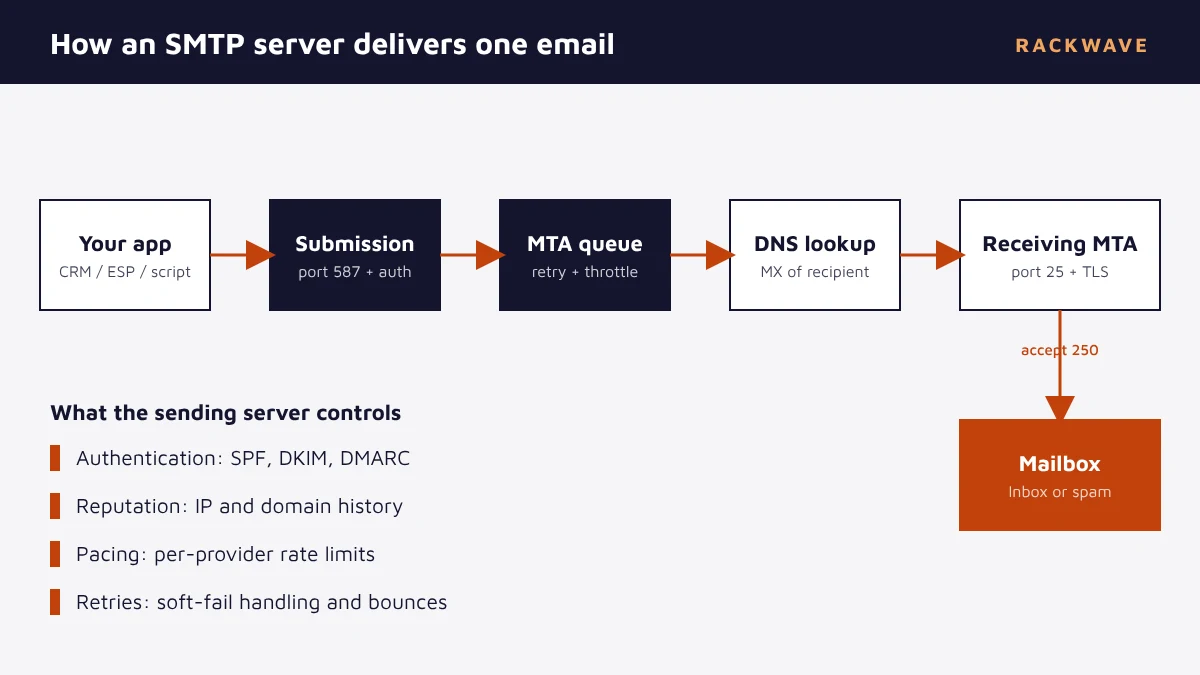
- Submission. Your application connects to the SMTP server, normally on port 587 with STARTTLS or port 465 with implicit TLS, and authenticates with credentials or an API key.
- Queueing. The server stores the message in a queue. This is where rate limits, retries and per-provider throttling are applied.
- DNS lookup. The server reads the recipient domain's MX records through the Domain Name System to find which host accepts mail for that domain.
- Handover. It connects to that host on port 25, negotiates TLS if offered and sends the message with the commands EHLO, MAIL FROM, RCPT TO and DATA.
- Response. The receiving server answers with a code. A 2xx code means accepted, 4xx means try again later and 5xx means permanent failure. Failures become bounces, covered in our guide to email bounces.
You can see the conversation yourself. The exchange below is a simplified session between two servers.
S: 220 mx.example.net ESMTP ready
C: EHLO mail.sender.example
S: 250-mx.example.net
S: 250 STARTTLS
C: STARTTLS
S: 220 Ready to start TLS
C: MAIL FROM:<news@sender.example>
S: 250 2.1.0 OK
C: RCPT TO:<alex@example.net>
S: 250 2.1.5 OK
C: DATA
S: 354 End data with <CR><LF>.<CR><LF>
C: (headers and body)  .
S: 250 2.0.0 Queued as 8F2A1
C: QUIT
SMTP ports: 25, 587, 465 and 2525
Most connection errors come from using the wrong port. Each port has a distinct purpose.
| Port | Used for | Encryption | Typical use |
|---|---|---|---|
| 25 | Server to server relay | Opportunistic STARTTLS | Delivery between mail servers; often blocked for end users by cloud hosts |
| 587 | Message submission | STARTTLS (upgrade) | Default for apps and mail clients, defined in RFC 6409 |
| 465 | Message submission | Implicit TLS from the first byte | Accepted alternative to 587 and supported by most providers |
| 2525 | Submission (unofficial) | STARTTLS | Fallback offered by some providers when 25 and 587 are blocked |
If you are choosing, use 587 with STARTTLS unless your provider documents 465. Avoid sending application mail on port 25, because many hosting companies block outbound traffic on it to limit spam.
SMTP server settings for common providers
People searching for an SMTP server host usually need the exact hostname. These are the values published by the largest providers at the time of writing. Check the provider's documentation before you rely on them, because authentication rules change.
| Provider | Host | Port and security | Notes |
|---|---|---|---|
| Gmail / Google Workspace | smtp.gmail.com | 587 STARTTLS or 465 SSL | Needs an app password or OAuth; subject to daily sending limits |
| Microsoft 365 / Outlook | smtp.office365.com | 587 STARTTLS | Basic authentication is being phased out; confirm the current policy for your tenant |
| Yahoo Mail | smtp.mail.yahoo.com | 465 SSL or 587 STARTTLS | Requires an app password |
| Your own or managed server | Hostname you set | 587 or 465 | Limits are set by you or your provider |
Be careful with free mailbox SMTP. Using a personal Gmail or Yahoo account to send application or marketing mail is fragile. Daily limits are low, the From domain will not match your brand and one complaint spike can lock the account. Use a transactional or bulk SMTP service for anything beyond a few messages a day.
Authentication: what an SMTP server must prove
Accepting a message is easy. Getting it into the inbox depends on proving who sent it. Receiving servers check three DNS-based standards, and the major mailbox providers now treat them as mandatory for bulk senders.
- SPF lists which IP addresses may send for your domain.
- DKIM adds a cryptographic signature to each message, defined in RFC 6376.
- DMARC ties SPF and DKIM to the visible From address and tells receivers what to do on failure.
Google's published email sender guidelines require senders of more than 5,000 messages a day to Gmail to authenticate with SPF, DKIM and DMARC, offer one-click unsubscribe and keep spam complaint rates low. A correctly configured SMTP server is the starting point, not the finish line.
An SMTP server that accepts your mail is not the same as one that delivers it to the inbox. The difference is authentication and reputation.
Reputation: IP addresses and domains
Mailbox providers score the sending IP address and the sending domain separately. A brand-new IP has no history, so providers limit how much they accept from it until it proves trustworthy. That is why new infrastructure needs a controlled ramp-up, described in our email warm-up guide.
Two further settings affect reputation from day one. Reverse DNS (a PTR record) should map the sending IP to a hostname that resolves back to the same IP. The EHLO name your server announces should be a real hostname you control. Mismatches on either are common reasons for early rejections.
Own SMTP server or managed SMTP service?
Running your own MTA with software such as Postfix, Exim or KumoMTA gives full control, but you take on queue management, IP reputation, feedback loops, blocklist monitoring and provider-specific throttling. A managed service takes that operational work off your team.
| Criteria | Self-hosted MTA | Managed SMTP service |
|---|---|---|
| Control over routing and IPs | Complete | Depends on the plan; dedicated IPs usually available |
| Time to first email | Days to weeks, plus warm-up | Minutes to hours after DNS setup |
| Reputation management | Your team | Shared with or delegated to the provider |
| Compliance and reporting | You build it | Usually included |
| Cost model | Servers plus engineering time | Per volume or flat plan |
If email is core to your product, a hybrid approach is common: a managed platform for speed, and a dedicated, high-performance MTA layer when volume and control justify it. Our MigoSMTP service is built on KumoMTA for that reason, and Migomail adds campaign tooling on top.
How to choose an SMTP provider
Use this checklist when you compare providers. Ask for evidence on each point rather than accepting a feature list.
- Authentication support: easy SPF, DKIM and DMARC setup, with custom return-path domains.
- Dedicated IP options: including help with a warm-up schedule.
- Deliverability tooling: bounce processing, complaint feedback loops and suppression lists.
- Visibility: per-message logs and webhooks for delivered, bounced and complained events.
- Security: enforced TLS, scoped credentials and audit logs.
- Support: engineers who can read a bounce log, not only a ticket queue.
How to set up an SMTP server connection in four steps
- Collect the settings. Hostname, port, security type, username and password or API key from your provider.
- Publish authentication records. Add the SPF and DKIM records the provider gives you, then a DMARC record at policy none to start monitoring.
- Send a test message. Send to a mailbox you control at Gmail and Microsoft and inspect the original headers for spf=pass, dkim=pass and dmarc=pass.
- Monitor the first week. Watch bounces, complaints and deferrals, and increase volume gradually.
Common SMTP errors and what they mean
| Code or message | Meaning | First fix |
|---|---|---|
| 535 Authentication failed | Wrong username, password or API key | Regenerate credentials; check the port and TLS setting |
| 550 5.7.1 Message rejected | Policy or reputation block at the receiver | Check blocklists, authentication and content |
| 421 4.7.0 Try again later | Temporary throttling | Slow down; the queue should retry automatically |
| Connection timed out on port 25 | Outbound port blocked by host | Use 587 or 465 instead |
Need a production-grade SMTP service?
Tell us your volume, regions and sending patterns. We will recommend an architecture and help you launch with a safe ramp.
Read next: Email Bounce: Hard vs Soft Bounces, Codes and Fixes · What Is DMARC? Policies, Reports and a Safe Rollout Plan · Email Warm Up: How to Warm a New IP or Domain Safely
Frequently asked questions
What is an SMTP server in simple terms?
An SMTP server is the computer system that sends your email on its journey. It accepts a message from your app or mail client, finds the recipient's mail server through DNS and delivers the message using the Simple Mail Transfer Protocol.
What is the difference between SMTP, IMAP and POP3?
SMTP sends and relays email between servers. IMAP and POP3 are used to read email from a mailbox. A mail client needs SMTP settings for outgoing mail and IMAP or POP3 settings for incoming mail.
Which SMTP port should I use?
Use port 587 with STARTTLS for most applications. Port 465 with implicit TLS is also widely supported. Port 25 is for server-to-server delivery and is often blocked for ordinary users.
What is the Gmail SMTP server address?
The Gmail SMTP host is smtp.gmail.com, using port 587 with STARTTLS or port 465 with SSL. Gmail requires an app password or OAuth sign-in, and personal accounts have low daily sending limits.
Is there a free SMTP server I can use?
Several providers offer free tiers with small daily limits, and mailbox providers such as Gmail allow limited SMTP use. Free options suit testing and very low volume. For business or marketing email, a dedicated service with authentication and reputation controls is safer.
Do I need SPF, DKIM and DMARC to send from my SMTP server?
You can send without them, but delivery will suffer. Gmail and Yahoo require all three for bulk senders, and unauthenticated mail is far more likely to be rejected or filtered to spam.
Why is my SMTP server not sending email?
The usual causes are wrong credentials, the wrong port or TLS setting, an outbound port blocked by your host, missing authentication records or a reputation block at the receiver. The SMTP response code in your logs usually points to the cause.
Should I run my own SMTP server?
Only if you have the engineering capacity to manage queues, IP reputation, blocklists and provider throttling. Most teams are better served by a managed SMTP service, moving to a dedicated MTA layer when volume and control needs grow.