

An SPF record is a DNS entry that lists which servers are allowed to send email for your domain. When a receiving server gets a message, it checks that record and decides whether the sending IP address is authorised. This guide covers the syntax, working examples for common senders, the ten-lookup limit that breaks many setups, and how to check and fix your record.
Short answer: An SPF (Sender Policy Framework) record is a TXT record on your domain that starts with v=spf1 and ends with an all mechanism, for example v=spf1 include:_spf.google.com ~all. You may publish only one SPF record per domain, and it may trigger no more than ten DNS lookups.
What is an SPF record?
Sender Policy Framework is specified in RFC 7208. It exists because the SMTP protocol lets anyone claim any sender address. SPF gives domain owners a way to publish the list of systems that may send on their behalf, which makes email spoofing harder.
SPF checks the envelope sender, the address used in the SMTP MAIL FROM command, also called the return-path. It does not check the From address that people see in their mail client. That gap is closed by DMARC, which requires the two domains to align.
How SPF evaluation works
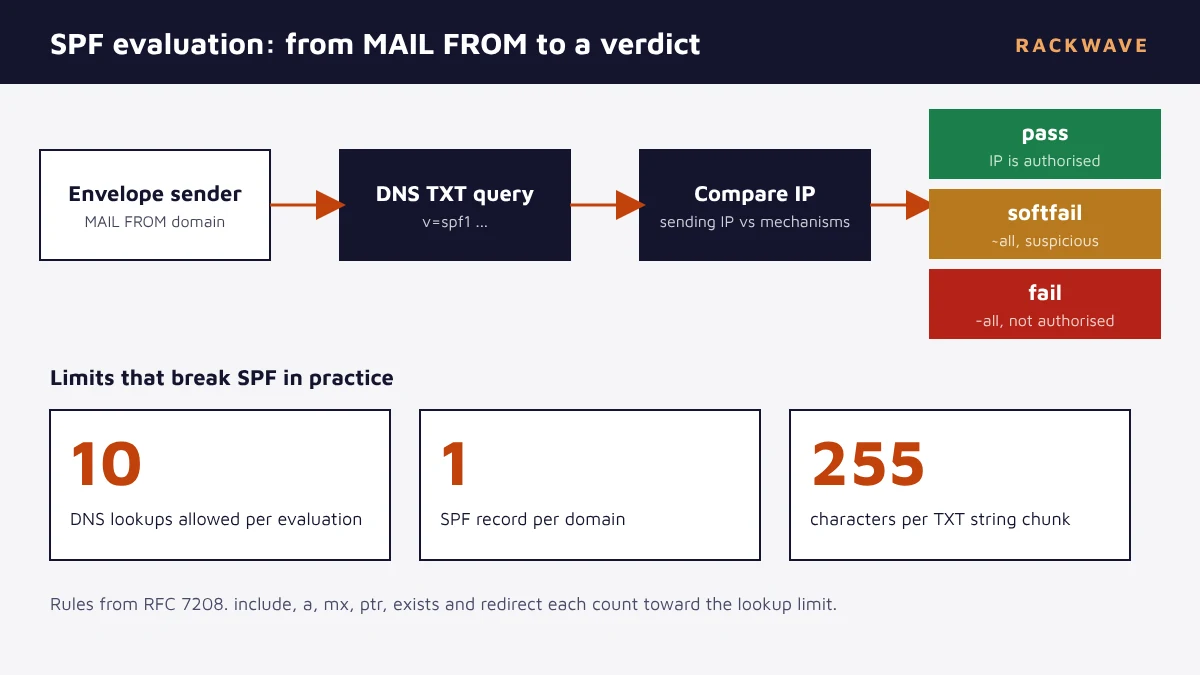
- The sending server connects. The receiving server notes the connecting IP address and the domain in MAIL FROM.
- The receiver queries DNS. It looks up the TXT records for that domain and picks the one beginning with v=spf1.
- Mechanisms are evaluated left to right. Each mechanism, such as ip4, include or mx, is tested against the connecting IP until one matches.
- A result is returned. The qualifier on the matching mechanism, or the final all, produces pass, fail, softfail, neutral, temperror or permerror.
SPF record syntax explained
A record is a single line of text made of a version tag, mechanisms and a closing rule. Here is a typical example.
example.com. IN TXT "v=spf1 ip4:203.0.113.10 include:_spf.google.com include:mailer.example.net ~all"| Part | Meaning | Example |
|---|---|---|
| v=spf1 | Version tag. Must come first | v=spf1 |
| ip4 / ip6 | Authorise an address or range | ip4:203.0.113.0/24 |
| a | Authorise the domain's A or AAAA record | a or a:mail.example.com |
| mx | Authorise the domain's mail servers | mx |
| include | Pull in another domain's SPF policy | include:_spf.google.com |
| exists | Match if a DNS name resolves (advanced) | exists:%{i}._spf.example.com |
| redirect | Use another domain's record entirely | redirect=_spf.example.com |
| all | Catch-all, always last | ~all or -all |
Qualifiers: plus, minus, tilde and question mark
A symbol in front of a mechanism sets the result when it matches. With none, plus is assumed.
| Qualifier | Result | What it tells the receiver |
|---|---|---|
| + | Pass | This sender is authorised |
| - | Fail | Reject or treat as unauthorised (hard fail) |
| ~ | Softfail | Probably unauthorised; accept but mark |
| ? | Neutral | No assertion either way |
Most organisations end with ~all while they are still discovering all of their senders, then move to -all once the list is complete. When DMARC is enforced, the difference between the two matters less, because DMARC policy decides what happens to failures.
SPF record examples for common senders
Always copy the include value from your provider's current documentation, because hostnames can change. These examples show the shape of a correct record.
| Setup | Example record |
|---|---|
| Google Workspace only | v=spf1 include:_spf.google.com ~all |
| Microsoft 365 only | v=spf1 include:spf.protection.outlook.com ~all |
| Workspace plus a bulk sender | v=spf1 include:_spf.google.com include:spf.sender.example ~all |
| Own server plus provider | v=spf1 ip4:203.0.113.10 include:spf.sender.example -all |
| Domain that sends no email | v=spf1 -all |
Parked domains need SPF too. A domain that never sends mail should publish v=spf1 -all. Attackers prefer unprotected lookalike and parked domains, so this single record removes an easy target.
The ten DNS lookup limit
RFC 7208 allows at most ten DNS-querying terms during one evaluation. The mechanisms include, a, mx, ptr, exists and the redirect modifier each count, and so do any lookups nested inside an include. Exceed the limit and the receiver returns permerror, which most systems treat as a failure.
This is the most common reason a record that looks correct still fails. Each SaaS tool you add, such as a CRM, helpdesk, newsletter tool and invoicing system, usually adds an include, and some providers' records contain several lookups of their own.
How to reduce lookups
- Remove unused includes. Audit every sender and delete tools you no longer use.
- Replace includes with ip4 or ip6 for static infrastructure you control. These cost no lookups.
- Move senders to subdomains. Send marketing mail from a subdomain with its own SPF record so each record stays small.
- Avoid ptr. It is slow, unreliable and discouraged by the specification.
- Use SPF flattening carefully. Flattening converts includes to IP lists, but it must be refreshed automatically or it will go stale when providers change addresses.
One domain, one SPF record, ten lookups. Most SPF failures are a breach of one of those three rules.
How to create and publish an SPF record
- List every sender. Include your mailbox provider, marketing platform, transactional service, CRM, support desk and any servers you run.
- Collect each provider's SPF value. Use the include or IP ranges given in their documentation.
- Build one record. Start with v=spf1, add each mechanism and finish with ~all.
- Publish it as a TXT record. Add it at the root of the domain in your DNS provider. If a record already exists, edit it instead of adding a second one.
- Test and monitor. Send test messages, read the Authentication-Results header for spf=pass and review DMARC reports for unexpected sources.
How to check an SPF record
You can inspect a record from the command line with a single query.
dig +short TXT example.com
# expected output
"v=spf1 include:_spf.google.com ~all"
For a full evaluation that counts lookups and flags syntax errors, use an online SPF checker. For real message results, open a delivered test email and look for spf=pass in the headers of the receiving mailbox.
Common SPF errors and fixes
| Problem | Cause | Fix |
|---|---|---|
| Multiple SPF records | Two TXT records start with v=spf1 | Merge them into one record |
| permerror: too many lookups | More than ten DNS terms | Remove includes, use ip4, split by subdomain |
| Missing sender | A tool sends mail but is not in the record | Add its include and retest |
| softfail on valid mail | Record lacks the sending IP | Add the IP range or provider include |
| Record over 255 characters | Single TXT string too long | Split into quoted strings in the same record |
| Passes SPF, fails DMARC | Return-path domain does not match From | Configure a custom return-path or rely on aligned DKIM |
If you send through a dedicated SMTP service, use a custom return-path on your own subdomain so SPF passes and aligns with your From domain. This is also a prerequisite for a clean SMTP server setup.
SPF, DKIM and DMARC together
SPF alone does not stop spoofing of the visible From address, and it can break when mail is forwarded because the forwarder's IP is not in your record. DKIM survives forwarding because the signature travels with the message. DMARC then requires at least one of the two to pass and align. Treat them as one system and configure all three.
SPF and email forwarding
Forwarding is the classic weakness of SPF. When a message is forwarded, the forwarder's server connects to the final recipient, so the connecting IP address is the forwarder's, not yours. Your SPF record does not list it, and the check fails even though the original message was genuine. Mailing lists and some security gateways behave the same way.
This is why DKIM matters. A DKIM signature is attached to the message itself and usually stays valid through a simple forward, so DMARC can still pass on the DKIM result. Sender-side fixes include signing every message with your own domain, and using a custom return-path so SPF aligns for direct delivery. Receiver-side techniques such as ARC help preserve the original results across trusted forwarders.
Keeping SPF healthy over time
An SPF record is not a one-off task. Teams adopt new tools, switch providers and retire old systems, and each change can leave stale entries or push the record past the lookup limit. A short quarterly review prevents most surprises.
- Re-check the lookup count after adding or removing any sending tool.
- Confirm with each provider that its include value is still current.
- Compare the record with your DMARC reports to spot senders you forgot.
- Document who owns the record so changes are not made by guesswork.
Not sure your SPF record is safe?
We audit SPF, DKIM, DMARC and sender reputation across your domains and give you a prioritised fix list.
Read next: Email Bounce: Hard vs Soft Bounces, Codes and Fixes · What Is DMARC? Policies, Reports and a Safe Rollout Plan · Email Warm Up: How to Warm a New IP or Domain Safely
Frequently asked questions
What is an SPF record?
An SPF record is a TXT entry in your domain's DNS that lists the servers allowed to send email for that domain. Receiving mail servers read it to decide whether a message from your domain came from an authorised source.
What does a basic SPF record look like?
A basic record looks like v=spf1 include:_spf.google.com ~all. It begins with the version tag v=spf1, lists authorised senders using mechanisms such as include or ip4, and ends with an all mechanism that sets the default result.
How do I check my SPF record?
Query the TXT record with a command such as dig +short TXT yourdomain.com, or use an online SPF checker that validates syntax and counts DNS lookups. To confirm real-world results, send a test message and look for spf=pass in its headers.
How many SPF records can a domain have?
Only one. If a domain publishes two TXT records that start with v=spf1, receivers return a permanent error. Merge all senders into a single record.
What is the SPF 10 lookup limit?
RFC 7208 caps SPF evaluation at ten DNS-querying terms, counting include, a, mx, ptr, exists and redirect, including nested ones. Going over produces permerror, which usually causes SPF to fail.
What is the difference between ~all and -all?
The ~all ending is a softfail: unauthorised mail should be treated with suspicion but is usually still accepted. The -all ending is a hard fail: unauthorised mail should be rejected. Many teams start with ~all and move to -all when every sender is accounted for.
Does SPF stop email spoofing on its own?
No. SPF checks the envelope sender, not the visible From address, and it can fail on forwarded mail. Combine it with DKIM and a DMARC policy so receivers can act on the domain people actually see.
Do I need an SPF record if I only use Google Workspace or Microsoft 365?
Yes. Both services publish an include value that you must add to your domain's SPF record. Without it, mail from your domain is more likely to be flagged or rejected.