
An email bounce happens when a message cannot be delivered and the receiving server sends it back with an error. Bounces are normal in small numbers, but a rising bounce rate damages sender reputation and wastes budget. This guide explains what an email bounce is, the difference between hard and soft bounces, how to read SMTP bounce codes, what bounce rate to aim for and how to fix the causes.
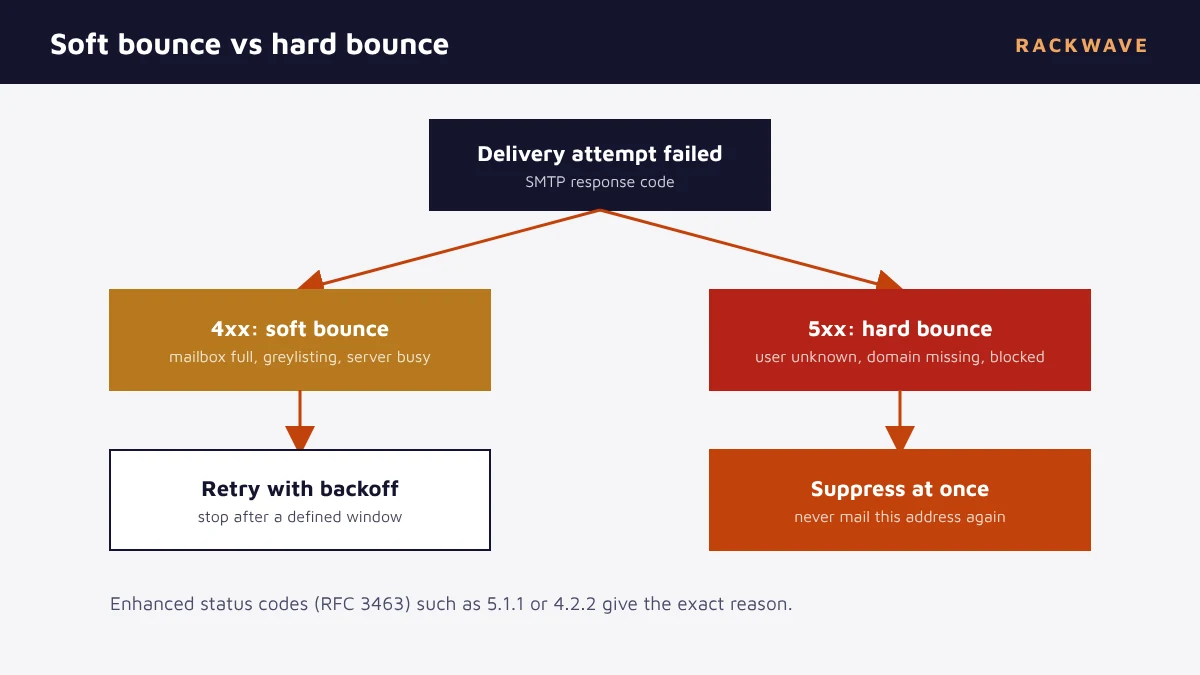
Short answer: A hard bounce is a permanent failure (5xx), such as an address that does not exist, and the address should be suppressed immediately. A soft bounce is a temporary failure (4xx), such as a full mailbox or a busy server, and is retried automatically. Keep your hard bounce rate low, commonly under 2%.
What is an email bounce?
A bounce, formally a bounce message or non-delivery report, is the automated notice a mail system produces when it fails to deliver a message. It can come from the recipient's server during the SMTP conversation or from a later asynchronous report.
Understanding bounces matters because mailbox providers watch how you respond to them. Repeatedly mailing addresses that do not exist is a classic sign of poor list hygiene, and it quickly harms deliverability.
Hard bounce vs soft bounce
| Hard bounce | Soft bounce | |
|---|---|---|
| Nature | Permanent failure | Temporary failure |
| SMTP code class | 5xx | 4xx |
| Typical causes | Address does not exist, domain missing, recipient server blocks you | Mailbox full, server busy, greylisting, message too large |
| What your system should do | Suppress the address immediately | Retry with backoff, then give up after a set window |
| Reputation impact | High if repeated | Low unless it persists |
Types of soft bounce
- Mailbox full: the recipient has no storage left. It may clear, but persistent cases should be treated as inactive.
- Server unavailable or busy: the receiving server is down or throttling you.
- Message too large: reduce attachments or image weight.
- Greylisting: some servers defer first-time senders on purpose and accept a retry. See greylisting.
Block bounces
Some failures are neither a dead address nor a blip. A block bounce means the receiver refused your mail because of reputation, content or authentication, for example a 554 5.7.1 rejection. These need diagnosis, not just suppression, because the recipient address may be perfectly valid.
How to read SMTP bounce codes
Every rejection carries a three-digit SMTP code, usually followed by an enhanced status code defined in RFC 3463 such as 5.1.1. The first digit tells you the class. The text after the code often names the real cause.
| Code | Meaning | Bounce type | What to do |
|---|---|---|---|
| 550 5.1.1 | Mailbox does not exist | Hard | Suppress the address |
| 550 5.1.10 / 5.4.1 | Recipient not found or rejected at the domain | Hard | Suppress; verify the address source |
| 552 5.2.2 / 452 4.2.2 | Mailbox over quota | Soft | Retry; suppress if it persists |
| 421 4.7.0 | Try again later; rate limited | Soft | Slow down and let the queue retry |
| 450 4.2.0 / 451 4.7.1 | Greylisting or temporary policy | Soft | Retry later |
| 554 5.7.1 | Blocked for policy, reputation or content | Block | Check blocklists, authentication and content |
A bounce is a message from the internet telling you exactly what is wrong. Most senders simply never read it.
What is a good bounce rate?
There is no single official threshold, but a widely used rule of thumb is to keep the hard bounce rate below 2% of delivered attempts per campaign, and many platforms will warn or pause an account that exceeds higher figures. Well-maintained lists often sit well below 1%. Watch the trend as well as the number, because a sudden rise points to a specific problem such as a bad import.
Why emails bounce
- Typos at signup. Addresses like gmial.com are a common source of hard bounces.
- Old or purchased lists. People change jobs and abandon mailboxes, so unmaintained lists decay.
- Spam traps. A spamtrap is an address that exists to catch senders with poor list practices. Hitting one can lead to blocks.
- Authentication failures. Missing SPF or DMARC alignment can produce policy rejections.
- Reputation problems. A cold or damaged IP gets throttled or blocked. See our warm-up guide.
- Infrastructure issues. Wrong reverse DNS, bad EHLO hostnames or an unstable SMTP server also cause errors.
How to reduce your email bounce rate
- Validate at capture. Use double opt-in or real-time address validation on forms so mistyped and fake addresses never enter your list.
- Suppress hard bounces immediately. Never retry a 5xx address. Make sure your platform adds it to a suppression list automatically.
- Set a soft bounce policy. Retry with backoff for a defined window, and suppress addresses that soft bounce repeatedly across several campaigns.
- Clean the list regularly. Remove contacts that have not engaged for a long period and re-verify old segments before mailing them.
- Authenticate your mail. Publish SPF, DKIM and DMARC, and keep reverse DNS and EHLO settings correct.
- Monitor and alert. Track bounce rate by provider and campaign, and alert when it jumps.
Handling bounces in your system
How retries work depends on the mail server. Postfix, for instance, keeps retrying deferred mail for up to five days by default before returning it as undeliverable. High-volume platforms usually tune this per provider and use shorter windows for marketing mail than for transactional messages.
Make sure bounce data flows back to your application. A return-path address or webhook should feed delivered, deferred and bounced events into your CRM, so a hard-bounced contact is suppressed everywhere, not only in the tool that sent the message. Migomail and MigoSMTP process bounces and expose them through webhooks for exactly this reason.
Do not delete bounce data. Keep the original response text and code with each event. It is the evidence you need when a provider blocks you and you have to explain what happened.
Bounces and sender reputation
Mailbox providers read bounce behaviour as a quality signal. A sender that keeps mailing non-existent addresses shows that it does not manage its list, and providers respond with throttling, spam placement or blocking. A small number of hard bounces in a large send is normal, but repeating them campaign after campaign is not.
Soft bounces matter too when they cluster. If a single provider defers a large share of your mail, it is often rate limiting you, which means the volume or sending pattern needs adjusting. Slowing down and spreading sends across a longer window usually clears it.
Bounce handling checklist for developers
- Parse the SMTP code and enhanced status code, not just the text.
- Separate hard, soft and block categories in your data model.
- Suppress hard bounces globally across all lists and tools.
- Count soft bounces per address and set a threshold for suppression.
- Store the full diagnostic text for audits and provider escalations.
- Alert on bounce rate by provider so a single blocklist is spotted early.
How long should you keep retrying a soft bounce?
There is no universal answer. Transactional mail such as a password reset is time-sensitive, so a short retry window of a few hours is sensible, while newsletters can wait longer because a late delivery is still useful. Whatever you choose, apply exponential backoff, so each retry waits longer than the last, and stop when the window ends. Constant rapid retries look like abuse and can turn a temporary deferral into a block.
Do bounces and unsubscribes mean the same thing?
No. A bounce means delivery failed. An unsubscribe means a recipient chose to stop receiving mail. Both lead to suppression, but they are logged and reported separately, and unsubscribes carry legal weight in many jurisdictions. A spam complaint is a third category, recorded when a recipient marks your message as junk, and it should also trigger immediate suppression.
Bounce rate climbing?
We analyse your bounce logs, list sources and authentication, then give you a prioritised plan to fix delivery.
Read next: What Is DMARC? Policies, Reports and a Safe Rollout Plan · Email Warm Up: How to Warm a New IP or Domain Safely · SPF Record: Syntax, Examples and How to Fix Common Errors
Frequently asked questions
What is an email bounce?
An email bounce is a failed delivery. The recipient's mail server or your own server rejects the message and returns an error, so the email never reaches the inbox.
What is the difference between a hard bounce and a soft bounce?
A hard bounce is a permanent failure, for example because the address does not exist, and shows as a 5xx code. A soft bounce is temporary, such as a full mailbox or busy server, and shows as a 4xx code.
What is a good email bounce rate?
Keep hard bounces under about 2% as a rule of thumb, and ideally below 1% for a clean list. Watch for sudden increases, which usually indicate a list quality or authentication problem.
Why do my emails keep bouncing?
The usual causes are invalid addresses, outdated lists, full mailboxes, spam trap hits, missing authentication, low sender reputation or server configuration problems. The code in the bounce message points to the cause.
Should I remove soft bounced addresses?
Not at the first soft bounce. Retry automatically, and suppress an address if it keeps soft bouncing over several campaigns or a set period.
What does 550 5.1.1 mean?
It means the recipient mailbox does not exist. It is a hard bounce, so the address should be suppressed and not mailed again.
How do I check an email bounce?
Read the bounce notice or your platform's delivery log, and note the SMTP code and the text after it. The enhanced status code, such as 5.1.1 or 4.2.2, tells you the exact reason.
Do bounces affect deliverability?
Yes. A high hard bounce rate signals poor list hygiene and can reduce sender reputation, leading to throttling, spam-folder placement or blocking.