
What is middleware? Middleware is software that sits between applications, operating systems or databases and lets them communicate, exchange data and work together without being rewritten. It handles the plumbing: translating formats, routing messages, managing security and keeping a record of what happened. This guide explains what middleware is, the main types, how it works, examples, and when a business needs it.
Short answer: Middleware is the connective layer between software systems. Instead of every application talking to every other application directly, each one talks to the middleware, which translates, routes and controls the traffic.
What is middleware?
Middleware is often described as "software glue". It provides services that applications need but that are not part of the business logic itself: messaging, authentication, data transformation, transaction handling and monitoring. The term was first used for software that connected distributed systems, and it still describes the same job today.
A simple picture helps. Imagine a company with an ERP for finance, a CRM for sales, a warehouse system and a website. Each speaks a different data format and protocol. Without middleware, each pair needs its own custom connection. With middleware, each system connects once to the central layer and the layer handles the rest.
How middleware works
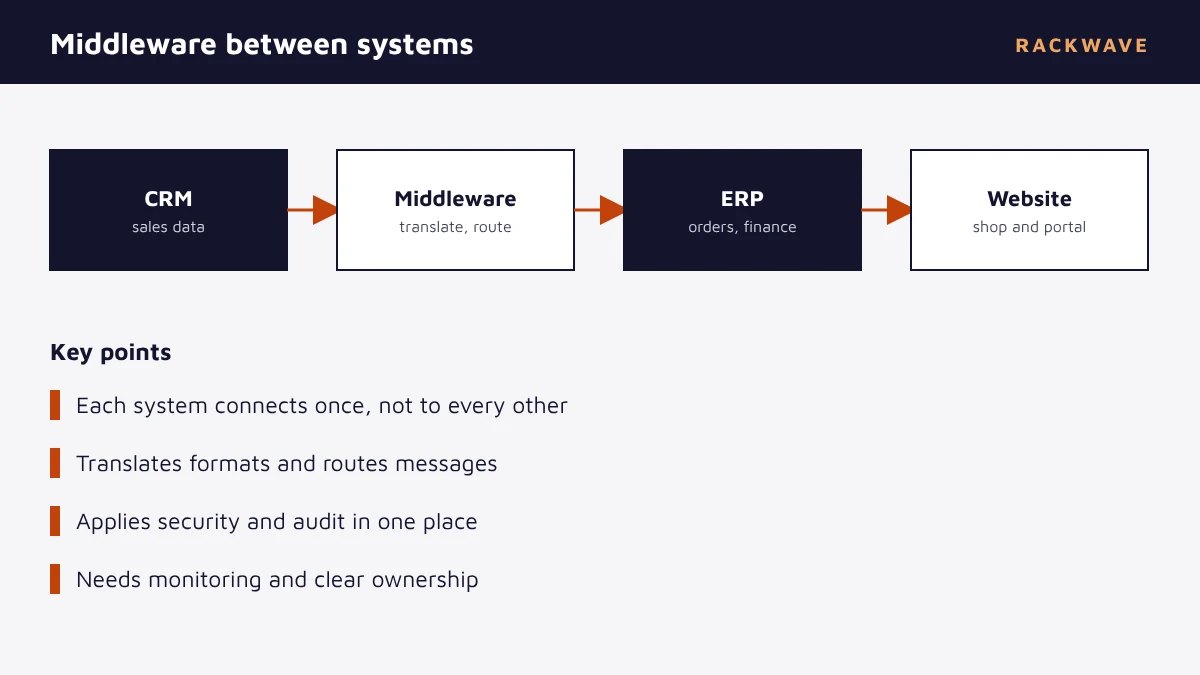
- Receive. A source system sends a request or message to the middleware, using a protocol such as HTTP, a message queue or a file transfer.
- Translate. The middleware converts the data to the format the target understands, for example XML to JSON or one field model to another.
- Route. It decides where the message goes and in what order, based on rules.
- Deliver and confirm. The target system receives the data and the middleware records success, retries on failure or raises an alert.
Types of middleware
| Type | What it does | Typical example |
|---|---|---|
| Message-oriented middleware | Passes asynchronous messages through queues so systems do not need to be online together | RabbitMQ, Apache Kafka |
| Remote procedure call | Lets a program call a function on another machine as if it were local | gRPC |
| Database middleware | Gives applications a common way to reach different databases | JDBC, ODBC drivers |
| Application server | Hosts business logic and provides services such as transactions and security | Java EE servers, Node runtimes |
| Enterprise service bus | Central hub that routes and transforms messages between many systems | MuleSoft, WSO2 |
| API management | Publishes, secures and monitors APIs | API gateways |
| Integration platform as a service | Cloud-hosted integration with connectors and orchestration | MuleSoft Anypoint, Boomi, Workato |
The categories overlap. A modern integration platform usually combines messaging, transformation, API management and monitoring in one product.
Middleware examples in everyday systems
- Online payments: the shop sends an order to a payment middleware layer that talks to banks and fraud checks, then returns a single result.
- Airline booking: one search touches many airline systems through middleware that normalises their different responses.
- Retail: point-of-sale, stock and e-commerce systems stay in step through message queues.
- Healthcare: an integration engine moves patient data between clinical systems using standard formats.
- CRM and ERP: orders flow from sales to finance without manual re-keying.
Why businesses use middleware
- Fewer point-to-point links. N systems need N connections, not N times N minus one over two.
- Isolation from change. Replace the CRM and only its connector changes, not every other system.
- Reliability. Queues and retries mean a temporary outage does not lose data.
- Security and governance. Authentication, encryption and audit logs are applied in one place.
- Speed of delivery. Prebuilt connectors shorten new integrations.
Without middleware, every new system multiplies the number of connections you must build and maintain. With it, each new system adds just one.
Middleware vs API vs ESB vs iPaaS
| Term | What it is | How it relates |
|---|---|---|
| API | A defined interface a system exposes | Middleware often calls and publishes APIs. See what is an API |
| Middleware | Software layer between systems | The broad category |
| ESB | A central bus for routing and transforming messages | A traditional, centralised kind of middleware |
| iPaaS | Cloud-based integration platform | The modern, hosted form of middleware |
The architecture choices behind these terms are discussed in our guide to what is system integration, and the bus pattern is covered in MuleSoft ESB.
Middleware in a hub-and-spoke design
A common design is hub and spoke. The middleware is the hub; each application is a spoke with a single adapter. Adding a system means writing one adapter, and every other system can reach it through the hub. The hub also becomes the place to apply shared rules: validation, enrichment, retry policy and audit. The risk is that the hub becomes a bottleneck or a single point of failure, so it must be designed for scale and high availability.
# Simplified message flow
order.created  (CRM)
  -> middleware validates payload
  -> maps CRM fields to ERP fields
  -> posts to ERP order API
  -> on failure: retry 3x, then alert and park message
  -> on success: write ERP order id back to CRM
How to choose middleware
- List the systems and data flows. Include volumes, direction and how fast each flow must be.
- Decide synchronous or asynchronous. Real-time lookups need request and reply. Bulk or event flows suit queues.
- Check connectors. Availability of tested connectors for your CRM, ERP and cloud apps saves months.
- Assess operations. Monitoring, alerting, retry handling and logging decide how painful life is in production.
- Review cost and skills. Licensing models differ, and so does the skill set your team needs.
- Run a proof of concept. Build one real flow end to end before you commit.
Practical tip: Pick middleware for the integrations you will have in three years, not only the three you need this quarter. Migrating integration platforms later is expensive.
Synchronous and asynchronous middleware patterns
Two patterns cover most needs. In a synchronous pattern, the caller waits while the middleware fetches or posts data and returns an answer, which suits a customer service agent looking up an order in real time. In an asynchronous pattern, the caller hands over a message and carries on, while the middleware delivers it when the target is ready. Asynchronous designs absorb spikes, survive outages and keep systems loosely coupled, but they make end-to-end tracking harder, so every message needs a correlation identifier that follows it through every step.
A third pattern, publish and subscribe, lets one event reach many consumers. When an order is paid, billing, fulfilment and analytics can all receive the same event without the sender knowing who they are. This is the basis of event-driven architecture.
Challenges and risks
- Poor design that turns the hub into one giant, fragile script.
- No ownership of interfaces, so nobody knows what breaks when a system changes.
- Hidden business logic buried in transformations that only one person understands.
- Insufficient monitoring, so failed messages sit unnoticed.
- Vendor lock-in when proprietary connectors and formats spread everywhere.
Good governance reduces these risks: named interface owners, documented contracts, version control for integration code and dashboards that show message volume and failures.
Middleware and Salesforce
Many Salesforce programmes depend on middleware to connect the CRM to ERP, billing and data platforms. MuleSoft is the best-known option in that ecosystem, and our Salesforce integration guide describes the patterns used. Our system integration service and MuleSoft service cover design, build and support.
Key takeaways
- Middleware is the layer that lets separate systems communicate and share data.
- It translates, routes, secures and monitors traffic between applications.
- Types include message queues, application servers, ESBs and iPaaS.
- It replaces fragile point-to-point links with managed, reusable connections.
- Governance, monitoring and clear ownership decide whether it succeeds.
Quick glossary
| Term | Meaning |
|---|---|
| Message queue | A buffer that stores messages until the receiver is ready |
| Connector | A prebuilt adapter for a specific application |
| Transformation | Converting data from one format or structure to another |
| Orchestration | Coordinating several steps across systems |
| Dead-letter queue | A holding area for messages that could not be processed |
Read next: What Is MuleSoft? Anypoint Platform and API-Led Connectivity · MuleSoft API-Led Connectivity · MuleSoft Anypoint Platform
Frequently asked questions
What is middleware in simple terms?
Middleware is software that sits between two or more applications and lets them exchange data. It translates formats, routes messages and manages security so the applications do not need direct custom connections.
What are examples of middleware?
Examples include message brokers such as RabbitMQ and Kafka, integration platforms such as MuleSoft and Boomi, API gateways, application servers and database drivers such as JDBC.
What is the difference between middleware and an API?
An API is an interface that a system exposes. Middleware is a layer that connects systems and may use or publish APIs. Middleware does the translating, routing and monitoring around them.
What are the types of middleware?
Common types are message-oriented middleware, remote procedure call, database middleware, application servers, enterprise service buses, API management and integration platforms as a service.
What is middleware used for in business?
Businesses use it to connect CRM, ERP, finance, e-commerce and data systems so information flows automatically, securely and with a record of every transaction.
Is middleware the same as an ESB?
No. An enterprise service bus is one kind of middleware that centralises routing and transformation. Middleware is the broader category and includes queues, gateways, servers and cloud platforms.
Do I need middleware?
If you have only two systems and one simple flow, a direct API call may be enough. As systems and flows multiply, middleware becomes cheaper and safer to run than many separate connections.
What is iPaaS?
Integration platform as a service is a cloud-hosted middleware platform that provides connectors, data mapping, orchestration and monitoring as a managed service.