
What is SQL? SQL, short for Structured Query Language, is the standard language for storing, retrieving, changing and managing data in relational databases. With a few readable statements you can ask a database for exactly the rows you want, combine tables, summarise results and update records. Nearly every business application, reporting tool and data platform speaks SQL in some form, which is why it remains one of the most valuable skills in technology after fifty years. This guide explains what SQL is, how relational databases organise data, the core commands, joins and aggregation with worked examples, performance basics and how SQL fits into modern analytics.
Short answer: SQL lets you query relational data with statements such as SELECT, INSERT, UPDATE and DELETE. Data is organised in tables of rows and columns, and tables are linked by keys so that you can combine them with joins.
What is SQL?
SQL was developed at IBM in the 1970s and later standardised, and it has outlasted countless technologies since. It is declarative: you describe what result you want, not the steps to compute it, and the database engine decides the best way to get it. That is why the same query can run quickly on a small table and still work on a table with billions of rows.
You will hear about different flavours, such as MySQL, PostgreSQL, SQL Server, Oracle and the SQL used by cloud warehouses. They share a common core and differ in details such as date functions and extra features, so skills transfer easily between them. Our guide to the database explains the systems that SQL talks to.
How relational data is organised
| Term | Meaning | Example |
|---|---|---|
| Table | A collection of rows with the same columns | customers, orders |
| Row | One record | A single customer |
| Column | One attribute of every record | email, created_at |
| Primary key | A column that uniquely identifies each row | customer_id |
| Foreign key | A column that points to a primary key in another table | orders.customer_id |
| Index | A structure that speeds up lookups | An index on email |
| Schema | The structure of tables and relationships | The shop database design |
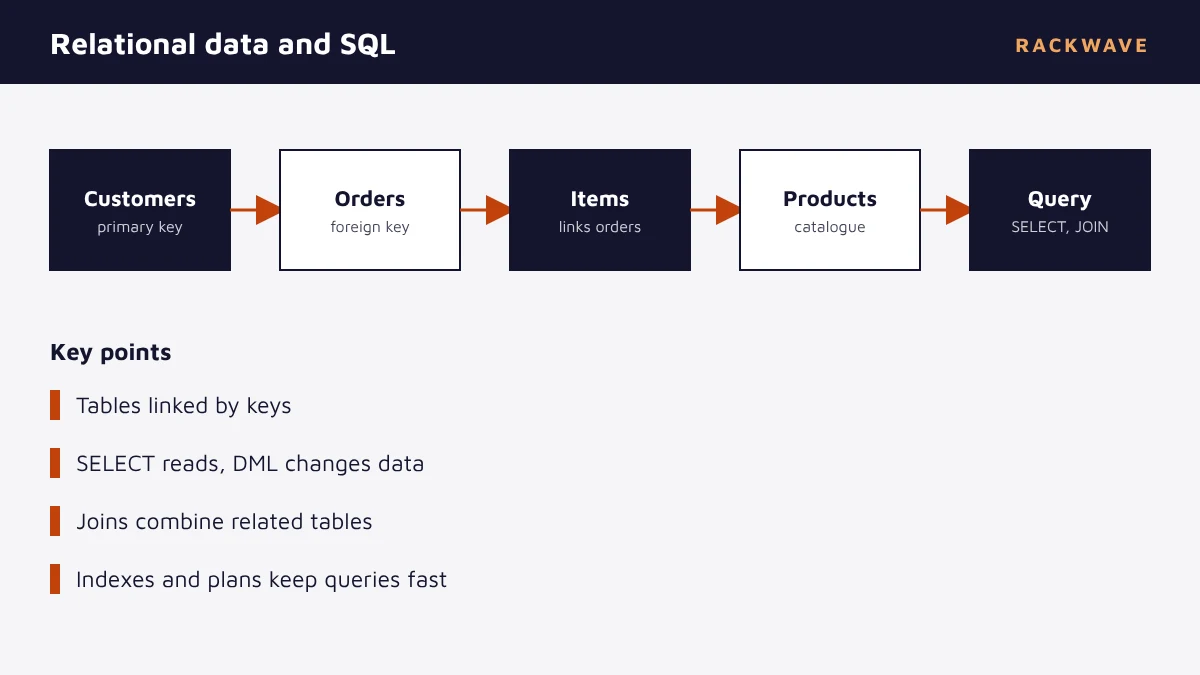
Splitting data across tables avoids repetition. A customer's details live in one row, and each order simply refers to the customer by key. When the customer changes their address, you change it in one place.
The main groups of SQL commands
| Group | Purpose | Main commands |
|---|---|---|
| Querying (DQL) | Read data | SELECT |
| Data manipulation (DML) | Change data | INSERT, UPDATE, DELETE |
| Data definition (DDL) | Define structure | CREATE, ALTER, DROP |
| Access control (DCL) | Manage permissions | GRANT, REVOKE |
| Transaction control | Group changes safely | BEGIN, COMMIT, ROLLBACK |
Your first queries
The SELECT statement does most of the work. These examples use a simple shop database with customers, orders and order items.
-- Customers in a region, newest first
SELECT customer_id, name, email, created_at
FROM customers
WHERE region = 'APAC'
ORDER BY created_at DESC
LIMIT 20;
-- Insert, update and delete
INSERT INTO customers (name, email, region)
VALUES ('Asha Rao', 'asha@example.com', 'APAC');
UPDATE customers SET region = 'EMEA' WHERE customer_id = 42;
DELETE FROM customers WHERE customer_id = 99;Always use a WHERE clause on UPDATE and DELETE. Without one, the statement changes or removes every row. Run the same condition as a SELECT first, check the rows returned, and use a transaction so you can roll back a mistake.
Joins: combining tables
| Join type | Returns | Use when |
|---|---|---|
| INNER JOIN | Rows with a match in both tables | You only want records that relate |
| LEFT JOIN | All rows from the left table, matches from the right | You want everything on the left, even without matches |
| RIGHT JOIN | All rows from the right table, matches from the left | Rare; usually rewritten as a left join |
| FULL OUTER JOIN | All rows from both tables | You need unmatched rows from either side |
| CROSS JOIN | Every combination of rows | Generating combinations, used carefully |
-- Revenue per customer, including customers with no orders
SELECT c.customer_id,
       c.name,
       COUNT(o.order_id)          AS orders,
       COALESCE(SUM(o.amount), 0) AS revenue
FROM customers AS c
LEFT JOIN orders AS o
       ON o.customer_id = c.customer_id
      AND o.status <> 'cancelled'
GROUP BY c.customer_id, c.name
ORDER BY revenue DESC;
The condition on cancelled orders sits in the join, not in WHERE, which keeps customers without qualifying orders in the result. Placing it in WHERE would silently turn the left join into an inner join, a very common mistake.
Aggregation and grouping
Aggregate functions such as COUNT, SUM, AVG, MIN and MAX summarise many rows into one value, and GROUP BY decides the groups. HAVING filters groups after aggregation, as WHERE filters rows before it.
SELECT region,
       COUNT(*)      AS customers,
       AVG(lifetime) AS avg_lifetime_value
FROM customer_summary
GROUP BY region
HAVING COUNT(*) >= 100
ORDER BY avg_lifetime_value DESC;
Most SQL mistakes are not syntax errors. They are questions answered correctly for the wrong set of rows.
Window functions and common table expressions
Two features lift SQL from basic to powerful. Common table expressions, written with WITH, break a complex query into named steps. Window functions calculate across related rows without collapsing them, for running totals, ranks and comparisons with the previous row.
WITH monthly AS (
  SELECT DATE_TRUNC('month', order_date) AS month,
         SUM(amount)                      AS revenue
  FROM orders
  GROUP BY 1
)
SELECT month,
       revenue,
       LAG(revenue) OVER (ORDER BY month)            AS prev_month,
       revenue - LAG(revenue) OVER (ORDER BY month) AS change
FROM monthly
ORDER BY month;
Function names for dates differ between database systems, so check the documentation of the one you use.
Making SQL fast
- Create indexes on columns used in WHERE, JOIN and ORDER BY, but not on everything, because indexes slow writes.
- Avoid SELECT * in production queries. Ask only for the columns you need.
- Filter early and avoid applying functions to indexed columns in conditions.
- Use EXPLAIN to see how the database runs your query and where it scans whole tables.
- Keep statistics current and archive old data that is rarely queried.
- Use parameterised queries from application code to avoid SQL injection, a leading web security flaw. See cyber security.
SQL and NoSQL
Relational databases suit structured data with clear relationships and strong consistency, such as orders, payments and inventory. Other systems, grouped as NoSQL, store documents, key-value pairs, graphs or wide columns and suit flexible structures and extreme scale. They are covered in what is NoSQL. Many modern platforms support both, and even NoSQL products increasingly offer SQL-like query languages.
SQL in analytics and data engineering
SQL is the common language of analytics. Analysts write it to answer questions, BI tools such as Power BI and Tableau generate it behind the scenes, and engineers use it to build the transformation layers described in data engineering. Cloud platforms keep data in a data warehouse or data lake that you query with SQL, and ETL pipelines move data into place. Python often works alongside it, as discussed in what is Python.
Salesforce uses its own query dialects for CRM data, SOQL and SOSL, which resemble SQL closely. See Salesforce Apex for how they are used in code. Our data analytics service and data warehousing service help organisations build reliable SQL-ready data foundations.
How to learn SQL
- Get a practice database. Install a free database or use a hosted sandbox with sample data.
- Learn SELECT, WHERE and ORDER BY. Filter and sort until it feels natural.
- Master joins. Draw the tables on paper and predict the row count before running the query.
- Learn GROUP BY and aggregates. Answer questions such as revenue by month.
- Add CTEs and window functions. These make complex analysis readable.
- Read execution plans. Learn why a query is slow and how an index changes it.
Key takeaways
- SQL is the standard language for querying and managing relational data.
- Data sits in tables linked by primary and foreign keys, and joins combine them.
- SELECT reads data; INSERT, UPDATE and DELETE change it, and a WHERE clause protects against broad changes.
- CTEs and window functions make advanced analysis clear.
- Indexes, narrow column lists and execution plans keep queries fast.
Quick glossary
| Term | Meaning |
|---|---|
| Primary key | A unique identifier for each row |
| Join | Combining rows from tables by related columns |
| Index | A structure that speeds up lookups |
| CTE | A named temporary result defined with WITH |
| Transaction | A group of statements that succeed or fail together |
Read next: What Is NoSQL? Types, Examples and When to Use It · What Is Data Visualization? Chart Types and Best Practice · What Is a Database? Types, Concepts and How to Choose
Frequently asked questions
What is SQL used for?
SQL is used to create and manage relational databases and to retrieve, filter, combine, summarise and update data. It underpins business applications, reporting tools, data warehouses and analytics.
What does SQL stand for?
SQL stands for Structured Query Language, the standard language for working with data in relational database management systems.
Is SQL a programming language?
SQL is a domain-specific language designed for data. It is declarative rather than general-purpose, so you describe the result you want and the database decides how to produce it.
What is the difference between SQL and MySQL?
SQL is the language. MySQL is one database system that uses the language. PostgreSQL, SQL Server and Oracle are others, each with small differences in dialect and features.
What are the main types of SQL joins?
Inner join returns matching rows, left join keeps all rows from the left table, right join keeps all from the right, full outer join keeps all from both and cross join returns every combination.
What is the difference between WHERE and HAVING?
WHERE filters individual rows before grouping. HAVING filters groups after aggregation, for example keeping only regions with more than a hundred customers.
How do I make a SQL query faster?
Index the columns you filter and join on, select only the columns you need, filter early, avoid functions on indexed columns and use EXPLAIN to inspect the execution plan.
Should I learn SQL or Python first?
For working with business data, SQL is usually the better first step because most data lives in databases. Python then adds analysis, automation and modelling on top. Many roles use both.