
Push notifications are short messages sent to a person device, either a mobile app or a web browser, that appear on the screen even when the app or site is not open. They let a business reach customers instantly with timely, relevant information such as order updates, reminders, alerts and offers. Used well, they bring users back, support onboarding and reduce churn. Used badly, they lead people to switch them off or uninstall the app. This guide explains what push notifications are, how they work, the types, how to build a strategy with consent and segmentation, how to write effective messages, how to measure results and the mistakes that damage trust.
Short answer: Send push notifications only when they are timely and useful to the recipient. Ask for permission at a moment that makes the value clear, trigger messages from behaviour and lifecycle stage, limit frequency, personalise content and measure opt-in, open and downstream conversion rates.
What are push notifications?
A push notification is delivered by a platform service rather than requested by the app each time. The mechanism is outlined in the article on push notifications. There are two main forms: mobile app push, delivered through the operating system, and web push, delivered through the browser. Push is one channel within customer engagement and works best alongside email, SMS and in-app messages as part of omnichannel marketing.
How push notifications work
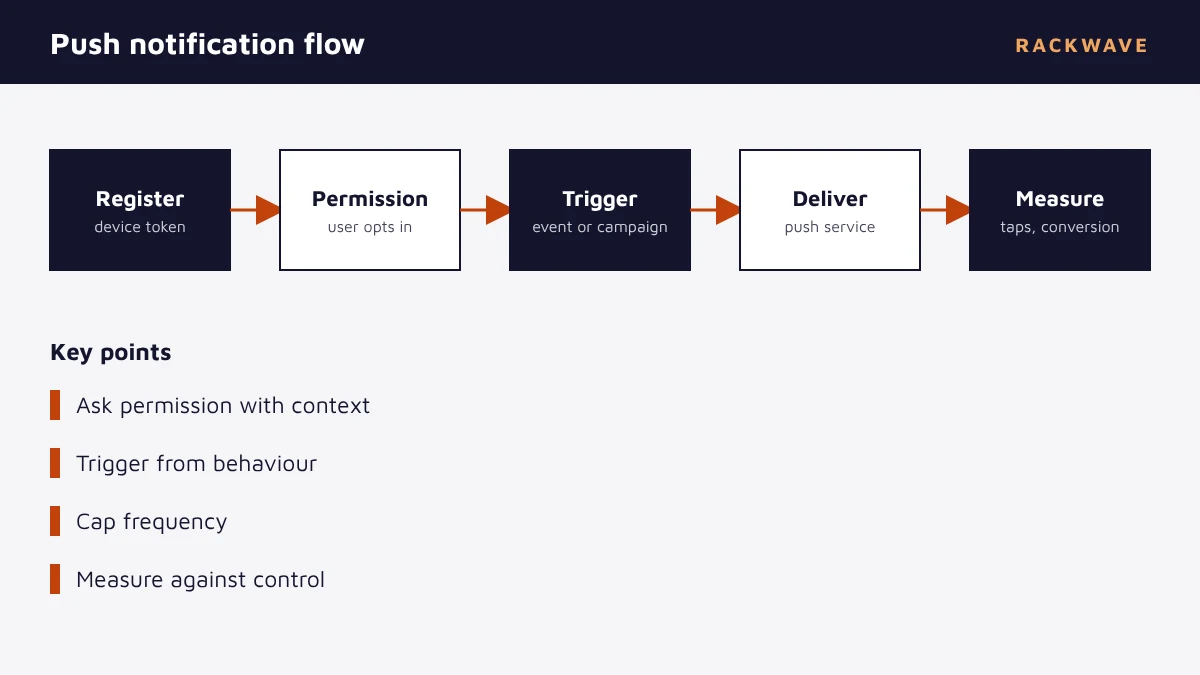
- The app or site registers the device. The operating system or browser issues a unique token for that installation.
- The user grants permission. Messages can only be sent to those who opt in, and prompts must be well timed.
- An event or campaign triggers a message. Examples are an order shipped, a cart left behind or a scheduled announcement.
- The engagement platform sends it through the push service. Apple and Google services route messages to devices.
- The device displays it. The user can tap to open the app or dismiss.
- Engagement is recorded. Deliveries, opens and conversions feed analytics and further journeys.
Types of push notifications
| Type | Purpose | Example |
|---|---|---|
| Transactional | Confirm or update something the user did | Order shipped, payment received |
| Lifecycle and behavioural | Guide users based on their journey. See lifecycle marketing | Onboarding tips, abandoned basket reminder |
| Reminders and alerts | Prompt timely action | Appointment tomorrow, price drop on a saved item |
| Promotional | Share offers or content | Sale starts today for loyalty members |
| Re-engagement | Bring back inactive users | A message about new features since last visit |
| Rich push | Add images, buttons or carousels | Product image with Add to cart button |
A good push notification is one the customer would have asked for if they had thought of it.
Push notifications vs email vs SMS
| Channel | Strengths | Limits |
|---|---|---|
| Push | Immediate, free to send, rich interaction | Requires app or permission, easy to disable |
| Long-form, rich content, wide reach. See marketing automation | Slower to be seen, crowded inboxes | |
| SMS | Very high visibility. See SMS marketing | Cost and stricter consent rules |
| In-app message | Contextual while user is active | Only reaches active users |
How to build a push notification strategy
- Define goals by lifecycle stage. Decide what push should achieve for activation, engagement and retention.
- Design the permission experience. Explain the value before the system prompt, and ask when it is relevant.
- Segment and trigger by behaviour. Use events and attributes, not only broadcasts. See customer segmentation.
- Write clear, useful messages. Lead with the benefit and give one action.
- Set frequency and quiet hours. Cap messages per day and week, and respect time zones.
- Test and optimise. Compare copy, timing and channels using control groups.
- Measure and govern. Track opt-in, opt-out and conversion, and keep consent records.
Writing effective push notifications
- Keep titles and text short and put the key point first.
- Make the benefit specific, such as a date or item name.
- Use the name or details the customer has provided only where they help.
- Include one clear action and deep link to the right screen.
- Match tone to the moment, calm for alerts and warm for rewards.
- Avoid false urgency and repeated pressure.
Platforms and implementation
Push is usually delivered by a customer engagement platform connected to your app and data. We implement and tune push programmes on Braze, CleverTap, Iterable and Klaviyo, integrating events from your product and CRM through our CRM and lifecycle service and API development service. Clean event tracking is the foundation, because a trigger can only be as good as the data that fires it.
Measuring push notifications
| Metric | What it shows |
|---|---|
| Opt-in rate | Share of users who allow push |
| Delivery rate | Messages that reach devices |
| Open or tap rate | Immediate interest |
| Conversion rate and revenue per message | Business value versus control |
| Opt-out and uninstall rate | Whether you are overdoing it |
| Retention of notified vs non-notified users | Long-term impact. See customer retention |
Common push notification mistakes
- Asking for permission the first time the app opens, with no context.
- Broadcasting the same message to everyone.
- Sending too often or at inappropriate times.
- Using notifications for content that belongs in email.
- Not handling deep links, so users land on the home screen.
- Ignoring consent, quiet hours and regional rules.
A short example
A fitness app asks every new user for permission the moment it opens, and only a third agree. It changes the flow: users complete a short goal-setting step, and the app then explains that reminders will help them keep to their plan before showing the system prompt. Opt-in rises sharply. It also replaces a daily broadcast with triggered messages: a reminder at the time each user usually trains, a congratulation on a streak and a gentle nudge after three inactive days. Retention improves and opt-outs fall. The change was not more notifications, but better timing and relevance based on what each user did.
Privacy and compliance
Push requires permission, but that does not remove other obligations. Record consent and preferences, explain what you send, honour opt-outs immediately and apply the rules that govern marketing messages in each region where you operate. Avoid placing sensitive information in the visible text of a notification, because it can be seen on a locked screen. Offer a preference setting inside the app so users can choose topics and frequency rather than switching everything off.
Push notifications across the customer lifecycle
Different stages call for different messages. New users benefit from short onboarding prompts that help them reach first value. Active users appreciate relevant alerts and reminders. Users who are drifting away respond better to a helpful reminder of what they have not yet tried than to a discount. Map each stage in your customer lifecycle management plan to one or two push journeys, and review them regularly so that content stays current and messages stay few.
Testing and optimisation
Test one variable at a time, such as wording, timing or image, and always keep a control group that receives no message so that you can see true lift. Examine results by segment, because new users and loyal users often react differently. Pay attention to long-term effects such as retention and uninstalls, not only taps.
Key takeaways
- Push notifications are short messages delivered to a device screen via a mobile app or web browser, with user permission.
- Use them for timely, useful events and lifecycle journeys rather than broadcast noise.
- Ask for permission with context, segment by behaviour, cap frequency and use deep links.
- Combine push with email, SMS and in-app messages in an omnichannel plan.
- Measure opt-in, tap rate, conversion versus control and opt-outs.
Quick glossary
| Term | Meaning |
|---|---|
| Opt-in | The user permission to receive notifications |
| Deep link | A link that opens a specific screen in the app |
| Rich push | A notification with images or buttons |
| Quiet hours | Times when messages are not sent |
| Token | A unique identifier for a device installation |
Read next: Voice of Customer: Sources, Programme and Examples · Omnichannel Marketing: Strategy, Examples and Technology · RFM Analysis: Scoring, Segments and Marketing Use
Frequently asked questions
What are push notifications?
Push notifications are short messages sent to a mobile app user or web browser that appear on the device screen even when the app or site is not open, with the user permission.
How do push notifications work?
A device registers with a push service, the user grants permission, an event or campaign triggers a message and the platform delivers it, with engagement tracked afterwards.
What are the main types of push notification?
Transactional, lifecycle and behavioural, reminders and alerts, promotional, re-engagement and rich push with images or buttons.
How can I increase push notification opt-in?
Explain the value before showing the system prompt, ask at a relevant moment, and offer clear topics and frequency controls.
How often should I send push notifications?
Only as often as they remain useful. Set caps per day and week, respect time zones and quiet hours and reduce frequency when opt-outs rise.
What is the difference between push and SMS?
Push needs an app or browser permission and is free to send. SMS reaches any phone number but costs more and has stricter consent rules.
How do I measure push notification success?
Track opt-in, delivery, tap rate, conversion and revenue compared with a control group, plus opt-out and uninstall rates and retention.
What are common push notification mistakes?
Asking for permission without context, broadcasting to everyone, sending too often, weak deep links and ignoring consent rules.